
Implementation support for agencies
White-Label GoHighLevel Implementation for Agencies
Your agency owns the client relationship.
I help you deliver the system behind it.
When a client needs more than a landing page, the work quickly expands. Forms, pipelines, follow-ups, and AI agents all need to work together.
I’m Mohan Singh. I help agencies build and connect these systems inside GoHighLevel – from individual implementation tasks to complete client setups.
Bring your client’s requirements or the part of the project that needs attention. We’ll define the scope, responsibilities, and timeline before the build begins.

- Funnels & CRM
- Workflow automation
- AI agents & integrations
- Walkthrough & documentation
From promise to process
You’ve agreed on the outcome. Now someone needs to connect the details.
Capturing an enquiry is only the beginning. The system needs to help the client handle what happens next.
An agency might sell a straightforward promise: capture enquiries, follow up, and help the client manage their leads. Delivering that promise means answering practical questions.
- Where should a new enquiry enter the CRM?
- What information does the team need before contacting the lead?
- What happens when someone replies, books, cancels, or stops responding?
- Which actions run automatically—and which need a person?
- How will the client know what needs their attention?
That is the implementation work I help agencies handle. The starting point is the same: understand the process before building the automation.
Three ways to work together
Choose the support your project needs
Build a complete client system
Connect customer-facing pages with the CRM and follow-up process behind them. The scope can include pages, forms, pipelines, calendars, communications, AI agents, and integrations.
Useful when
Your agency has sold a connected solution and needs support across the full journey.
Complete a specific part of the build
Get help with a defined requirement: a form-to-pipeline connection, appointment workflow, AI messaging setup, or integration with another tool.
Useful when
Your team owns the wider project but needs help with one component.
Improve an existing client setup
Review where the process breaks down, identify the cause, and agree on the changes needed.
Useful when
Enquiries arrive, but follow-ups, pipeline updates, bookings, or handoffs are inconsistent.
Connected implementation
What I can implement for your agency
Landing pages and enquiry forms
Build pages around the client’s offer and the next action a visitor should take. Connect forms to the information and processes the business needs.
- Service landing pages and lead-generation funnels
- Qualification fields and contact-field mapping
- Thank-you pages and submission confirmations
- Lead-source capture and workflow connections
The important connection
A submission should start the agreed next step, with the information the team needs to act.
CRM pipelines and lead management
Structure the CRM around how the client actually handles enquiries.
- Pipeline stages with clear meanings
- Opportunity creation and update rules
- Contact assignment and internal notifications
- Tags, custom fields, segmentation, and review rules
The important connection
The pipeline should help the team understand what has happened and what needs to happen next.
Email, SMS, and workflow automation
Build follow-up around specific events and conditions, including what happens when a contact replies, books, changes status, or no longer needs the sequence.
- Enquiry confirmations and follow-up sequences
- Appointment reminders
- Internal tasks and notifications
- Start, stop, and exit conditions
Automation needs exit conditions as well as starting triggers.
04
AI messaging and voice agents
Set up AI agents for agreed tasks: answering questions, collecting enquiry details, supporting booking, and handing conversations to the team.
- A defined purpose and approved information
- Qualification questions and permitted actions
- Human escalation and handoff rules
- Connections between conversations and the CRM
The agent should support a defined process, with clear boundaries and human handoffs.
Integrations between GoHighLevel and other tools
Connect systems when the client’s process extends beyond GoHighLevel. The approach may use native integrations, webhooks, APIs, n8n, Make, or Zapier.
- Define the data that needs to move
- Agree which system holds the authoritative record
- Map fields and actions between tools
- Define what happens if a transfer fails
Moving data is only useful when it arrives in the right place, in the right format, at the right point in the process.
An anonymous agency project
A roofing lead-generation system built for an agency
A connected setup the agency could offer to roofing businesses.
Roofing · Lead generation · GoHighLevel
The requirement
The agency needed more than a landing page: the enquiry journey had to connect with lead management and follow-up.
My role
I worked directly with the agency team to build the landing page, forms, pipelines, emails, workflows, integrations, and an AI messaging agent.
What the agency received
A connected roofing lead-generation system, with documentation explaining the setup and how to use it.
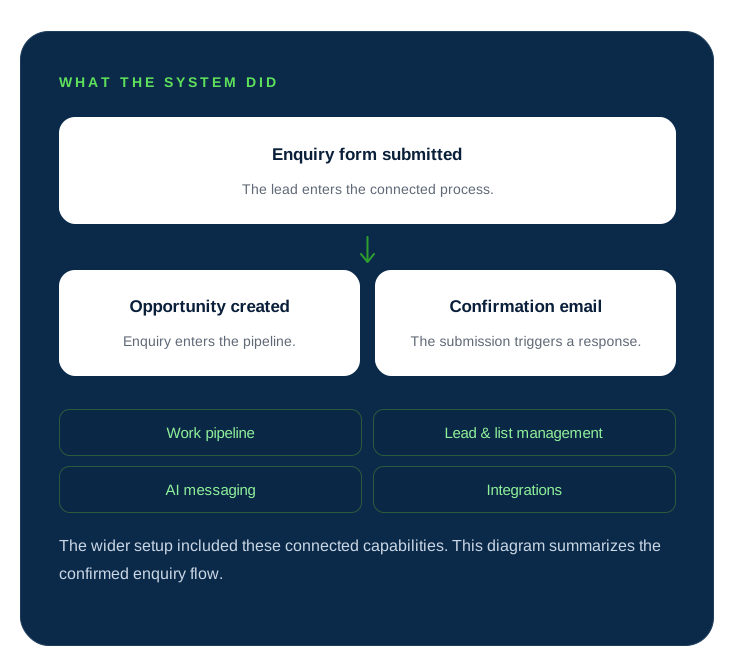
Agency and client names are withheld for confidentiality. This example describes delivered functionality, not a measured increase in leads or sales.
A clear delivery process
How we work together
Requirements first. Implementation next. A documented handover at the end.
Each stage has a clear purpose, from understanding the work to handing over the finished setup.
-
01
Share the brief and current setup
Tell me what your agency has agreed to deliver, who the end client is, and what already exists. A full brief or a defined task list works. We identify unclear requirements before setting the scope.
-
02
Agree on scope, responsibilities, and timeline
I review the requirements and relevant GoHighLevel setup. We establish what I will build, what your team provides, dependencies, and review steps. I then provide the quote and timeline.
-
03
Build the agreed customer journey
Implementation follows the agreed process: where enquiries enter, how information is organized, what runs automatically, and where the team takes over. Business decisions go back to your agency team.
-
04
Test the agreed scenarios
We follow the customer journey: submit a test enquiry, check the opportunity and message, and follow the next steps. AI actions and integrations need relevant test scenarios too.
-
05
Review, document, and hand over
I provide a walkthrough and documentation covering the delivered setup. Your agency reviews the work against the requirements. Ongoing support is quoted separately after delivery.
Agree on what success looks like
Define “done” before the project starts
A useful project brief describes behavior that can be checked.
Example acceptance requirement
“When a prospect submits the roofing enquiry form, create an opportunity in the New Enquiry stage, send a confirmation email, and notify the assigned team member.”
| Area | Example acceptance check |
|---|---|
| Enquiry form | A test submission creates or updates the intended contact fields. |
| Pipeline | The opportunity appears in the agreed pipeline and stage. |
| Confirmation | The correct message is triggered with the expected contact details. |
| Follow-up | The sequence starts under the agreed conditions and stops when appropriate. |
| Appointment booking | A test booking appears in the intended calendar and triggers the agreed next steps. |
| AI messaging | The agent handles a defined test enquiry and follows the agreed escalation rule. |
| Integration | A test record reaches the connected tool with the required fields. |
| Handover | The documentation identifies the delivered components and how to operate them. |
Illustrative checks. The final checklist depends on your project.
Shared clarity
Clear responsibilities make delivery easier
Before work begins, we agree on who provides each part of the project.
| Your agency provides or confirms | I handle within the agreed scope |
|---|---|
| The client’s offer, services, and business requirements. | Translating agreed requirements into the implementation. |
| Relevant GoHighLevel access and access to connected tools. | Configuring the components needed for the build. |
| Available branding, copy, assets, and approved customer messages. | Identifying missing resources and clarifying what is needed. |
| Decisions about qualification, follow-up, and human handoffs. | Building the agreed rules and connections. |
| Feedback and approval from the appropriate stakeholder. | Testing, agreed revisions, walkthrough, and documentation. |
If you need help preparing copy, mapping the process, or organizing other resources, include that in the brief so it can be scoped.
A note from Mohan
The useful question isn’t just “Can we automate this?”
It’s “What should happen next—and what should happen when the situation changes?”
A reply, cancellation, duplicate enquiry, or request for a person can change the next step. That is why I look at the full journey when discussing an agency project, even when my implementation covers only one part of it.
Mohan Singh
GoHighLevel implementation and automation
Before we begin
Questions your agency may have
Yes. The roofing project above is an example of a system built for an agency to sell to roofing businesses. We define what the system needs to include, which parts depend on each client’s business, and how those requirements affect implementation.
Yes. You can bring a complete implementation brief or a specific requirement, such as a workflow, pipeline, funnel, AI agent, or integration.
Yes. We can organize requirements, questions, feedback, and approval through your agency team. Any client-facing involvement or agency-branded communication should be agreed before work begins.
Yes. I will need relevant access and information about the existing setup so the scope can account for what is already in place.
The project brief or task list, relevant account access, and available resources. Depending on scope, these may include branding, service information, page copy, approved messages, calendar requirements, or access to connected tools.
The timeline depends on the scope, current setup, integrations, and availability of resources and feedback. I provide a timeline after reviewing the requirements.
Yes. Documentation and a walkthrough are part of the handover, covering the work delivered within the agreed scope.
Yes. If you need ongoing support or further improvements, I provide a separate quote after the project has been delivered.
I review the requirements before quoting. A complete client system and a single workflow repair require different scopes, so the quote reflects the work involved.
Build with a clear next step
What does your next client need you to deliver?
Bring the brief, the unfinished build, or the process your agency wants to offer.
We’ll clarify what needs building, what your team will provide, and the implementation work needed to move the project forward.
Speak directly with Mohan Singh about your agency’s project.