
GoHighLevel AI Receptionist for HVAC Companies: Setup, Booking, and Handoffs
Author - Mohan Singh | GoHighLevel for Agencies
October 19, 2026

An HVAC customer calls while your team is on another line. They need help, but your office cannot answer immediately. What happens next should be a clear business process: answer the enquiry, collect the right information, and arrange an appropriate next step.
A GoHighLevel AI receptionist can support that process. The important work is deciding what it may book, what information it must verify, and when a person needs to take over.
This guide explains how to design that system for an HVAC business, with example conversations, suggested workflows, and a launch checklist. The examples use a fictional company, ClearPath Heating & Cooling. They are proposed implementation patterns, not client results or a claim that a particular configuration has been tested in your account.
What is a GoHighLevel AI receptionist for HVAC?
It is a phone assistant configured around your HVAC company's services, policies, and call-handling rules. HighLevel's Voice AI supports answering questions, collecting information, booking appointments, and taking configured actions. See the official Voice AI capabilities overview.
For an HVAC company, a useful outcome might be a confirmed maintenance appointment, an estimate request assigned to an advisor, or a service concern passed to dispatch with a callback number.
The result must be visible to your team. A friendly conversation alone does not prove that a job was booked or that anyone received the request.
When is it useful-and when should you keep a human involved?
Consider starting with a narrow problem: routine calls that arrive while the office is busy, or after-hours enquiries that otherwise wait until morning.
Before investing, review a sample of recent calls. Classify them by reason: new repair enquiry, maintenance, replacement estimate, existing appointment, billing, sales call, or other. This gives you a practical starting scope.
| Call type | Suggested first-version behaviour | What needs a person |
|---|---|---|
| Routine maintenance enquiry | Check service area and collect details; book only against approved availability | Requests outside the standard service scope |
| New repair enquiry | Capture the reported problem and route for booking or review | Diagnosis, uncertain urgency, dispatch decisions |
| Replacement estimate | Collect the property and project basics | Final equipment recommendations and quotations |
| Existing customer's arrival question | Capture the reference and route to dispatch | Any live arrival estimate without a verified dispatch integration |
| Billing or complaint | Acknowledge the issue and request a human handoff | Disputes, refunds, exceptions |
| Reported safety concern | Interrupt routine sales questions and follow the approved escalation procedure | Emergency response and technical safety decisions |
Do not configure an AI receptionist to diagnose equipment faults or improvise repair instructions. If a caller reports a possible immediate hazard, the agent should use a locally approved safety message and direct them to the appropriate emergency service; the company callback queue must not be presented as a substitute.
1. Choose between live booking and a booking request
This decision affects almost every part of your setup.
Option A: Confirm an appointment during the call
Use this when the connected calendar represents capacity your business is prepared to honour. HighLevel documents live Voice AI booking with one calendar or multiple eligible calendars. Its current guide also distinguishes those options from the separate Services booking feature, which is not currently supported in Voice AI booking setup. Check the latest Voice AI appointment-booking documentation.
Illustrative use: ClearPath reserves four maintenance assessment appointments a day for online and AI bookings. Dispatch has agreed that these slots are available. The agent offers only those approved slots.
Option B: Collect a request for dispatch to confirm
Use this when availability depends on travel, technician skills, job duration, parts, or same-day changes that are not reliably represented in the booking calendar.
Illustrative use: A homeowner wants a repair visit tomorrow afternoon. The agent records that preference and tells them dispatch will confirm availability. It does not say that a technician is booked.
| Situation | Appropriate wording |
|---|---|
| Booking action succeeds and the appointment exists | “Your appointment is confirmed for [verified date and time].” |
| A preference was collected but no booking was made | “I've recorded your preferred time. Our team still needs to confirm availability.” |
| Booking action fails | “I couldn't complete the booking. Let me arrange a follow-up from the team.” |
| A transfer is attempted | “I'll try to connect you with our office.” |
Avoid calling a preference a reservation. Keep request and confirmed-booking statuses separate in your CRM.
Appointment confirmed
A successful booking action and a real appointment record.
“Your appointment is confirmed.”Request captured
Details saved for dispatch. Availability still needs confirmation.
“Our team will confirm availability.”Handoff needed
Try the office. If unanswered, offer a callback with an owner.
“I’ll try to connect you.”2. Prepare the business rules before configuring the agent
Build a short operating sheet that the owner or dispatcher approves.
| Decision | Example to define for your business |
|---|---|
| Service territory | Exact towns or postal codes served; how borderline addresses are handled |
| Supported work | Residential maintenance, repair enquiries, replacement estimates; exclusions |
| Appointment policy | Which requests can be confirmed automatically and which need dispatch approval |
| Pricing language | Approved diagnostic-fee wording; whether the agent may disclose it |
| Office coverage | Who handles transfers during office hours and after hours |
| Unknown questions | Collect details for a callback; never invent a policy |
| Existing jobs | How to identify the request without creating a second booking |
| Tenant enquiries | What information is needed before scheduling work at a rented property |
| Confirmation | Which system creates the authoritative appointment and sends its confirmation |
An important distinction: office opening hours, AI answering hours, and bookable appointment hours are different business decisions. For example, you may accept enquiries overnight while offering maintenance appointments only on weekdays.
If you already use field-service software, decide which system owns the schedule. Do not let GHL and a dispatch platform independently promise the same technician's time. A connected calendar should not be assumed to account for driving routes or job-specific skills.
3. Create a small, useful intake record
Ask the questions needed for the next action. A caller requesting maintenance should not have to complete a replacement-system sales questionnaire.
Suggested data to collect:
| Field | Purpose | Example |
|---|---|---|
| Name and confirmed callback number | Make follow-up possible | Alex Morgan; number repeated back |
| Service address and postal code | Check coverage and prepare the visit | Caller-provided address |
| Request category | Choose the correct route | Maintenance / repair / estimate / existing job |
| Reported issue or goal | Give the team useful context | “Upstairs AC is blowing warm air” |
| New or existing customer | Avoid unnecessary duplicate intake | Existing customer |
| Preferred availability | Record a request when live booking is unsuitable | Thursday afternoon |
| Booking outcome | Separate intention from action | Requested / confirmed / failed / declined |
| Human follow-up needed | Make exceptions visible | Yes-billing question |
Treat a customer's description as a reported symptom, not a diagnosis. “Caller reports a leak” and “refrigerant leak confirmed” are very different records.
When mapping fields, think about repeat customers. A caller may have two properties or more than one open job. Do not overwrite an earlier job's address or issue simply because a new call arrives. Preserve the relevant job context in the record structure your implementation uses.
4. Build a focused knowledge base
HighLevel supports connecting a knowledge base to a Voice AI agent. Use the official knowledge-base integration guide for account configuration.
For an HVAC receptionist, start with short, approved answers about coverage, services, booking policies, fees, and contact routes. Remove outdated promotions and conflicting statements before adding them.
Example knowledge entry
Question: Can you give me the final repair price over the phone?
Approved answer: “The final repair price depends on the technician's assessment. I can explain our approved visit-fee policy or ask the office to discuss your question.”
Escalation: If the caller asks for a discount, refund, or exception, refer them to the office.
Keep business rules in one maintained source wherever possible. If the fee changes, update the knowledge entry and any related message or prompt that repeats the old amount. Assign someone to review policy changes rather than assuming the website will always contain the correct operational answer.
5. Configure the Voice AI agent in HighLevel
In the correct sub-account, open AI Agents → Voice AI, create an agent, and set its identity, voice, language, timezone, greeting, and instructions. Connect its knowledge base and configure the actions it needs. Live deployment also requires an eligible phone number and suitable permissions. Follow HighLevel's create, test, and deploy guide for the current interface.
Start with one clear job, such as handling inbound maintenance and repair enquiries. Add complexity only after that route works reliably.
Example instruction brief
The following is an original starting brief. Replace the bracketed items, configure the actual actions, and test the result. A prompt alone does not create calendars, integrations, transfers, or workflows.
You are the AI phone assistant for [business name]. Introduce yourself as an AI assistant. Help callers with approved service information and the next appropriate step.
Ask one question at a time. Identify the reason for the call before collecting detailed information. Confirm the service location and callback number. Use approved business information; say when you do not know.
For [approved live-booking categories], check the configured availability and use the booking action. Announce confirmation only after the action succeeds. For other categories, record the request and explain that the team must confirm it.
Never diagnose faults, invent repair prices, promise technician arrival times, or imply emergency help has been dispatched. Follow the approved safety escalation procedure if needed.
When someone asks for a person, use the configured handoff path. If no one answers, explain that the transfer did not complete and use the callback fallback.
End by stating the actual outcome: confirmed appointment, request awaiting confirmation, or human follow-up needed.
Write instructions in terms the receptionist must act on. “Give great customer service” is less testable than “If no appointment was created, do not call the request confirmed.”
6. Connect actions to real outcomes
HighLevel distinguishes actions performed during a call from actions performed afterward. Use its during-call and post-call actions guide when configuring timing.
For your implementation, create an action map before building the supporting workflows:
| Intended outcome | Suggested implementation responsibility | Evidence to inspect |
|---|---|---|
| Book approved maintenance | Booking action and authorised calendar | Appointment record with the correct details |
| Request dispatch review | Save request details and create assigned work | Task or opportunity visible to the responsible person |
| Transfer to office | Configured transfer destination and fallback | Call outcome plus unresolved-callback record if needed |
| Preserve intake information | Explicit field mapping or post-call processing | Populated fields containing what the caller actually said |
| Notify staff | A notification workflow with a real recipient | Delivery result and a staff acknowledgement process |
Do not make an urgent task depend on a summary that may only be generated after the call. Conversely, do not send an internal summary before the required information has been written. Inspect the actual execution order during testing.
Example internal handoff format:
Request: Repair enquiry-dispatch review required
Caller: Alex Morgan
Callback: [confirmed number]
Address: [confirmed service address]
Reported issue: Upstairs AC blowing warm air
Preference: Thursday afternoon
Booking status: Not booked
Next action: Dispatcher to review capacity and contact caller
This gives the next person something actionable without asking them to reconstruct the whole conversation.
HVAC AI receptionist automation flow
This proposed flow connects the conversation to a verified outcome. It is a design example, not a screenshot of a deployed workflow. The safety and human-handoff routes remain available throughout the call.
Every call needs a clear next step.
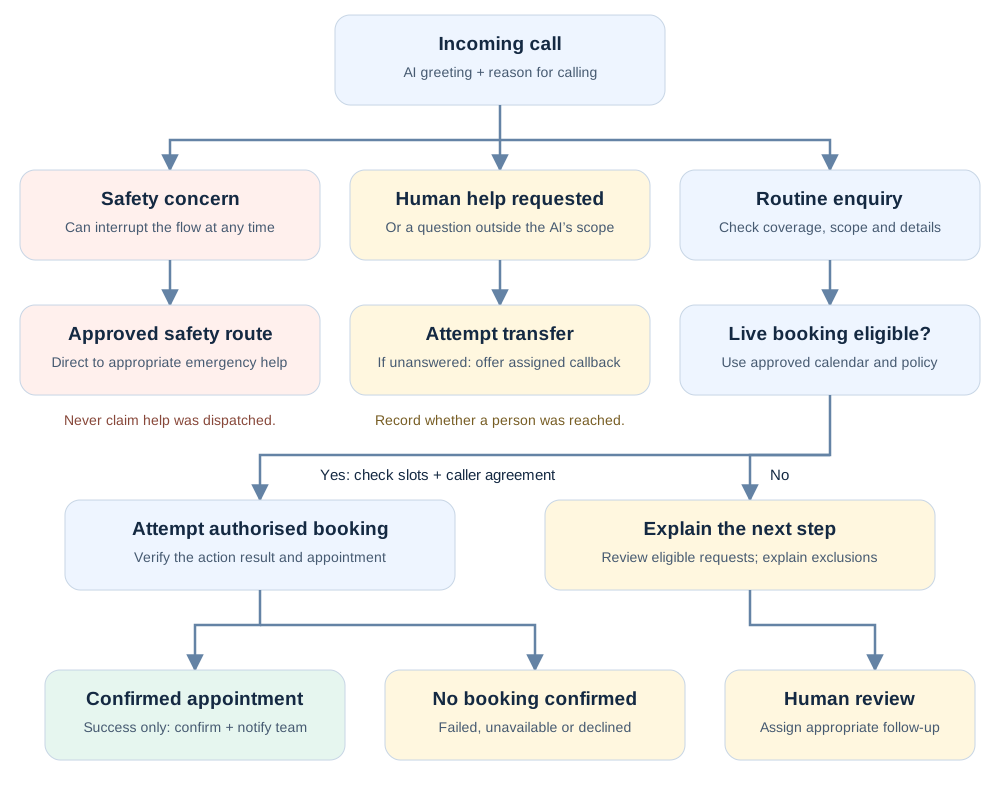
How to read the flow: An eligible maintenance enquiry can reach a confirmed appointment. A repair request needing dispatch review stays unconfirmed. An out-of-area caller receives the approved coverage explanation rather than an unsupported booking. No availability, a declined slot, and a failed booking are different outcomes and should be recorded separately.
What happens after the conversation: Save the actual outcome against the correct contact and job context. Create an assigned task when follow-up is accepted or required by the approved procedure. Send confirmations and reminders only for a verified appointment, through permitted channels. Stop obsolete booking prompts when the customer has already booked.
Important implementation detail: Each box represents behaviour you must configure and test. Drawing a transfer or notification in this diagram does not automatically create that action in HighLevel. The emergency route does not mean the AI has dispatched emergency help.
7. Design the follow-up around what actually happened
Create separate paths for a completed booking, an unconfirmed request, and a caller who did not proceed. These are proposed workflow designs; their triggers and field names need to be adapted to your account.
Path A: Confirmed appointment
After verifying a real appointment exists, send the agreed confirmation and notify the responsible team. Remove the customer from messages still asking them to book.
HighLevel separates calendar confirmation notifications from Voice AI post-call emails. Configuring one does not configure the other. Booking notification reference.
Path B: Request awaiting dispatch
Create an assigned review task and keep the status explicitly unconfirmed. Send an acknowledgement only through an appropriately configured and permitted channel.
Example acknowledgement:
Thanks for contacting ClearPath Heating & Cooling. We received your request for Thursday afternoon. Your appointment is not confirmed yet; our team will contact you about availability.
Path C: Customer did not book
If follow-up is appropriate, send a useful next step rather than repeatedly pressing for a booking. Choose the timing based on the request and your communication permissions.
Example:
Hi Alex, this is ClearPath Heating & Cooling following up on your maintenance enquiry. Would you like our office to help find an appointment time?
Before sending, check whether the person has since booked, replied, declined, or opted out. HighLevel's Stop on Response applies to a reply to a message from that particular workflow; it does not stop every separate sequence. See Workflow Settings.
Path D: Appointment changes
Handle cancellations and changes so customers do not receive reminders for an obsolete appointment. HighLevel provides an Appointment Status trigger. Test the exact events used in your account, including appointments made by staff and those made by AI.
8. Example HVAC conversations
These are illustrative scripts. Any available times, completed actions, and business policies must come from the real configuration.
Mock call: routine maintenance with confirmed booking
Illustrative role-play, not a customer recording or a tested-agent transcript. ClearPath Heating & Cooling and the caller below are fictional. Bracketed details must come from the real caller or configured systems. Stage directions describe the intended actions; they are not spoken lines.
This script can also be used for a staged audio demonstration. Keep the AI disclosure at the start and identify any published audio as a demo.
“Thanks for calling ClearPath Heating & Cooling. I'm the AI assistant. How can I help?”
“I'd like to arrange routine AC maintenance. I'm usually only home in the afternoon.”
“I can check our maintenance appointments. What is the service postal code?”
“[Service postal code].”
“We cover that area. What name should I put on the request?”
“Alex Morgan.”
“Thank you, Alex. What is the full service address?”
“[Service address].”
“I have [address repeated back]. Is that correct?”
“Yes.”
“What is the best number for our team to reach you?”
“[Callback number].”
“That's [number repeated back], correct?”
“Correct.”
“Have we serviced this property before?”
“No, this is my first appointment.”
“There is an afternoon maintenance appointment on [verified weekday and date] at [verified time and timezone]. Would you like that time?”
“Yes, please.”
“Let me complete that booking.”
“Your maintenance appointment is confirmed for [verified date, time and timezone] at [confirmed address].”
“Does that mean a technician will arrive at that exact minute?”
“That is your scheduled appointment time. I can't promise an exact arrival time beyond our approved scheduling policy. I can connect you with the office if you need clarification.”
“That's fine. Thank you.”
“You're welcome, Alex. Thank you for calling ClearPath Heating & Cooling.”
Expected records to inspect after this demo-not evidence of an actual completed call:
| Record | What should be visible |
|---|---|
| Contact | Alex Morgan and the confirmed callback number |
| Service request | Routine maintenance at the confirmed address |
| Appointment | Correct calendar, date, time and timezone; booking successful |
| Team notification | The appointment details and an owner responsible for the next step |
| Customer confirmation | One intended confirmation, if configured and permitted |
Failure branch: If the booking action fails, replace the confirmation line with: “I couldn't complete that booking, so no appointment is confirmed. Would you like me to ask our office to follow up?” Record an accepted callback request and assign it to the team. Do not send an appointment confirmation.
What to verify: The calendar entry exists, the information is correct, and the customer receives the intended confirmation once.
Example 2: Repair request that needs dispatch review
“My AC is running, but the house isn't cooling. Can someone come this afternoon?”
“I can collect the details for our dispatcher. I can't confirm a same-day visit. What address needs service?”
After collecting the necessary details and checking for an escalation need, the request is saved.
“I've recorded your request for this afternoon. Our team will contact you to confirm availability.”
What to verify: The request is assigned; it is not counted as a confirmed appointment.
Example 3: A caller asks for a replacement price
“How much is a new system for my house?”
“The price depends on the property and the installation requirements. I can help request an estimate. Are you replacing an existing system?”
What to verify: The agent collects relevant information without inventing a price or recommending equipment.
Example 4: An existing customer asks where the technician is
“I already have an appointment. When will the technician arrive?”
“I'll try to connect you with dispatch to check that. What name is the appointment under?”
What to verify: No new sales opportunity or duplicate appointment is created merely because the person called again. Without a reliable live status connection, the agent must not fabricate an arrival time.
Example 5: The office does not answer a transfer
“I'd rather speak with someone in the office about my existing appointment.”
“Of course. What name is the appointment under?”
“Alex Morgan.”
“I'll try to connect you with our office now.”
“I couldn't connect you just now. Would you like me to record a callback request?”
“Yes, please.”
“What number should they call?”
“[Callback number].”
“That's [number repeated back], correct?”
“Yes.”
“I've recorded your callback request about your existing appointment. I don't have a confirmed callback time to give you. Your appointment has not been changed.”
What to verify: The fallback saves the request and gives it an owner. The caller is not told that the transfer succeeded or promised an unsupported callback deadline.
9. Test more than the greeting
Use a scenario matrix and inspect both the conversation and the records it produces. HighLevel supports web and phone testing, but its current documentation says call transfer is not executed in a Web Call test. Validate transfers through a phone call. Testing reference.
| Test | Expected result |
|---|---|
| New maintenance enquiry in the service area | Correct intake and authorised booking or request route |
| Caller outside the service area | No unsupported booking; clear next step |
| Calendar has no availability | No invented slot; fallback offered |
| Caller requests same-day attendance | Promise matches dispatch policy |
| Existing customer calls again | Correct context; no accidental duplicate appointment |
| Caller changes their mind mid-call | Final record reflects the latest request |
| Caller asks for a person | Correct transfer and tested no-answer fallback |
| Caller reports a possible hazard | Routine sales flow stops; approved escalation used |
| Booking fails | Caller is told accurately; staff can see the failure |
| Name or address is unclear | Agent asks for clarification rather than guessing |
| Customer cancels or changes a booking | Reminders and follow-up reflect the change |
| Customer asks not to be messaged | Preference is respected across relevant workflows |
Record a pass or fail, the actual outcome, and the fix. Retest failed scenarios and any dependent paths after changes. Do not launch simply because one successful demonstration sounds convincing.
10. Common problems and where to investigate
| Symptom | Investigation starting point |
|---|---|
| Agent says “booked,” but nothing appears | Inspect the booking action result and wording; check whether the design only collects requests |
| Wrong appointment type | Inspect calendar selection and overlapping descriptions |
| Missing address in the staff notification | Inspect field mapping and whether the notification ran before data was saved |
| Customer gets duplicate texts | Look for overlapping calendar notifications, agent messages, and workflows |
| Call never reaches AI | Check phone routing, forwarding, answering mode, and configured hours |
| Transfer fails | Check the destination and test the complete phone path |
| AI gives an old fee | Search approved knowledge and prompts for conflicting or outdated values |
| Booking recorded in GHL but not dispatch | Inspect the integration and its failure handling; identify which schedule is authoritative |
These are diagnostic starting points, not claims that every symptom has one cause. Keep a copy of the call context and relevant execution details before making changes.
11. What should you budget for?
Separate the costs of the GHL subscription, AI usage or plan, phone services, messaging, setup, integrations, and ongoing maintenance. HighLevel's AI pricing documentation states that phone-system charges still apply separately, including with AI subscription plans. Verify current billing settings before estimating a project.
To estimate usage, start with your own call records. For example, 150 handled calls averaging 3 minutes equal 450 call minutes. This is an illustration, not an HVAC industry benchmark. Apply the actual plan and usage charges, then include any additional services.
Evaluate commercial value using completed work, not only bookings. An illustrative business calculation is:
Additional completed jobs × contribution per job − incremental monthly system cost.
If the assumptions are six additional completed jobs, $140 contribution per job before system cost, and $300 incremental monthly cost, the result is $540. Those are hypothetical figures, not a forecast. Verify that the jobs are genuinely additional and avoid counting the same benefit twice.
12. Measure quality before increasing automation
Review these measures during a limited rollout:
| Measure | Practical definition |
|---|---|
| Valid enquiry capture | Eligible calls with the information needed for the next step |
| Confirmed booking rate | Successful appointments divided by enquiries eligible for live booking |
| Dispatch response time | Time between an unconfirmed request and a team member acting on it |
| Handoff success | Requested transfers that reach the intended person |
| Booking errors | Wrong time, wrong type, duplicates, or spoken confirmations without records |
| Completed jobs | Actual completed work linked back to those enquiries |
| Cost per completed job | Attributable system costs divided by attributable completed jobs |
Exclude spam, vendors, and existing-job status calls from new-lead conversion calculations. Review unsuccessful calls as carefully as successful ones. A system that produces fewer bookings but stops making false promises may be improving.
Start with a limited scope, review calls frequently, and expand only after the team can handle the resulting workload. Keep a simple fallback route to your normal answering process if a deployment problem appears.
Frequently asked questions
Can an HVAC AI receptionist replace my dispatcher?
Treat its initial role as intake and approved scheduling support. Dispatch may depend on information and judgement the agent does not have. Decide which responsibilities can safely be delegated based on your actual operations.
Can it answer after hours?
Configure its answering availability to match your plan. Make the distinction clear to callers: receiving an enquiry overnight does not mean a technician is available overnight.
Do I need n8n, Make, or Zapier?
Only if your intended workflow requires connections your existing setup does not provide. Define the data exchange first: which system sends what, when it sends it, and what happens if it fails. Choose the integration method after checking the systems' supported capabilities.
Can I keep my existing field-service software?
That should be part of the design discussion. Establish which system owns appointments and jobs, then verify the available integration. Do not assume that any two platforms will stay synchronised without configuration and monitoring.
Will a snapshot make the system ready to launch?
A snapshot can provide a starting configuration. You still need to inspect business details, users, calendar references, destinations, messages, and actions in the receiving account. Run your own acceptance tests before sending customer calls through it.
How long does implementation take?
Scope it around the work required: business-rule approval, configuration, integrations, testing, and rollout. A simple demonstration and a dependable live service are different milestones. Avoid a fixed launch promise until those dependencies are understood.
Considering GoHighLevel for your team?
If you are evaluating the platform for this process, review its current plans and features against your requirements before choosing. A subscription still needs configuration, connected services, and testing for your business.
Still need help setting this up?
About the author: Mohan Singh works with GoHighLevel, CRM workflows, and business automation.