
GoHighLevel Workflows Not Working? A Practical Troubleshooting Checklist
Author - Mohan Singh | GoHighLevel CRM, Workflows
October 26, 2026
A contact never enters. A message does not arrive. An appointment reminder fires twice. Start with the visible symptom, then find the first point where the actual result differs from what you intended.
Choose the relevant case, check its evidence, apply the fix only if the cause is confirmed, and repeat the original event. You do not need to change every setting in this guide.
These are possible causes and proposed tests—not a claim that every account has these problems. The examples are illustrative. There is no universal list that covers every custom integration or future platform change.
Before you change anything
Preserve the current configuration and a brief change note. Avoid bulk re-enrollment while investigating: contacts may repeat actions already completed.
Where does the process break?
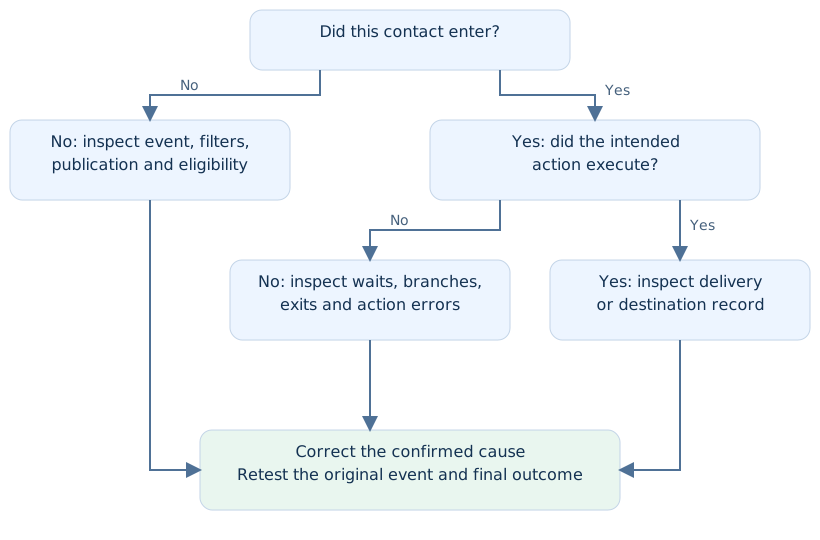
Enrollment History helps establish entry and exit. Execution Logs help locate individual steps. Review the exact enrollment associated with the incident; a contact can have several runs. HighLevel also offers contact-path highlighting and, where available, links from message details to a workflow execution. [1]
A. Nobody enters the workflow
Platform references: [2] · [3] · [14]. Cases are diagnostic hypotheses; confirm them against your own records.
01Workflow is still in Draft
- If / check
- If no live event starts the workflow, check its current publish state.
- Fix if confirmed
- Confirm the selected workflow and account, then resolve configuration errors before publishing the intended version.
- Retest
- Repeat the real entry event with an internal test contact.
02The trigger watches the wrong event
- If / check
- If contacts are created but never enrolled, contact creation may not be the event your trigger expects.
- Fix if confirmed
- Compare the original action with the trigger type: a form submission, tag change, or appointment event are different inputs.
- Retest
- Perform the exact event the workflow is intended to handle.
03The selected form is not the live form
- If / check
- If a replaced or duplicated page stops producing enrollments, inspect the actual embedded form.
- Fix if confirmed
- Compare its identity with the Form Is selection and correct the mismatch.
- Retest
- Submit the public landing-page form and check that specific enrollment.
04A trigger filter excludes the contact
- If / check
- If only some leads fail, compare a failing lead with a working lead.
- Fix if confirmed
- Check every filter against actual event data; narrow the mismatch before changing the rules.
- Retest
- Run one matching and one deliberately nonmatching test.
05The event happened before activation
- If / check
- If an old record never enters after publishing, do not assume old events will be replayed.
- Fix if confirmed
- Generate a new qualifying event. Review a separate backfill plan if historical records also need processing.
- Retest
- Confirm a fresh event works before enrolling any historical audience.
06You are looking at another account or copy
- If / check
- If the page and workflow both look correct, check location, workflow ID, and duplicate names.
- Fix if confirmed
- Trace the form or integration to the actual sub-account and intended workflow.
- Retest
- Keep the location, workflow, and test-contact identifiers in one test record.
B. New contacts work; repeat events do not
Platform references: [2] · [4] · [13]. Cases are diagnostic hypotheses; confirm them against your own records.
07The contact has already completed a one-time journey
- If / check
- If a returning contact fails, inspect its prior enrollment and repeat-entry settings.
- Fix if confirmed
- Choose repeat behavior deliberately. Appointment and invoice triggers have exceptions; do not assume one rule covers every trigger.
- Retest
- Compare a fresh contact and a previously completed contact.
08The contact is already active
- If / check
- If another event seems ignored, check whether an ordinary contact journey is still running.
- Fix if confirmed
- Decide whether the new event should update the current request or start a genuinely separate process.
- Retest
- Complete or deliberately end the test run, then recreate the event.
09The test does not reproduce the trigger
- If / check
- If manual enrollment works but production does not, the trigger remains unproven.
- Fix if confirmed
- Use the original entry path with its filters and event context.
- Retest
- Submit the real form or create the relevant test event.
10The tag was present before the test
- If / check
- If a tag-based test does nothing, establish whether the configured tag event actually occurred.
- Fix if confirmed
- In a test record, create the intended qualifying change rather than merely observing an existing tag.
- Retest
- Capture the change time and look for the matching run.
11Multiple opportunities need different handling
- If / check
- If one contact has several jobs, inspect which opportunity started each journey.
- Fix if confirmed
- Check multiple-opportunity handling and ensure each message refers to the correct deal.
- Retest
- Use two test opportunities and trace their results separately.
12The source event does not reach HighLevel
- If / check
- If an external form has a submission but HighLevel has no corresponding event, inspect the integration first.
- Fix if confirmed
- Check source execution history, location selection, credentials, and field mapping.
- Retest
- Trace one new submission from source to destination before testing follow-up.
C. The contact enters but does not progress
Platform references: [4] · [5]. Cases are diagnostic hypotheses; confirm them against your own records.
13A fixed wait has not elapsed
- If / check
- If the contact is sitting at a delay, compare elapsed time with the actual duration and units.
- Fix if confirmed
- Correct an unintended duration; leave a deliberate delay intact.
- Retest
- Record the expected release time and verify it after that time.
14The wait expects an event that never occurs
- If / check
- If progression depends on a reply or condition, inspect whether that requirement has been met.
- Fix if confirmed
- Correct the event or condition, and define a timeout or fallback where supported and appropriate.
- Retest
- Test both event received and event absent paths.
15A date input is missing or unsuitable
- If / check
- If a date-based wait behaves unexpectedly, inspect the resolved input rather than the placeholder.
- Fix if confirmed
- Repair field mapping and use a valid date in the format the action expects.
- Retest
- Test a future date and a missing-date path.
16The scheduled date is already in the past
- If / check
- If reminders skip, exit, or run immediately, inspect the past-date rule.
- Fix if confirmed
- Select the outcome that fits the business process rather than forcing an outdated reminder.
- Retest
- Use one future and one past test date.
17A communication window delays the send
- If / check
- If internal updates occur but a message waits, check permitted days and hours.
- Fix if confirmed
- Align sending hours and timezone with the intended audience.
- Retest
- Compare one event inside and one outside the window.
18An edit is being judged against an existing wait
- If / check
- If you changed a Wait but an existing contact behaves as before, check its current run.
- Fix if confirmed
- New settings do not rewrite existing waits. Review those contacts separately before moving them.
- Retest
- Compare an existing test enrollment with a fresh one.
D. The wrong branch or exit is taken
Platform references: [1] · [6] · [7]. Cases are diagnostic hypotheses; confirm them against your own records.
19The condition reads the wrong field
- If / check
- If the form shows a value but routing disagrees, inspect which field the condition actually evaluates.
- Fix if confirmed
- Map the form and condition to the intended field; distinguish similarly named fields.
- Retest
- Submit two contrasting values and inspect both routes.
20Blank input is treated like a valid answer
- If / check
- If incomplete enquiries go to a specialist, check how empty values reach the default path.
- Fix if confirmed
- Add a deliberate missing-information route instead of assuming blank means no.
- Retest
- Leave the field empty and verify the clarification or review step.
21AND / OR or an operator is wrong
- If / check
- If too many or too few contacts qualify, rewrite the rule in plain language.
- Fix if confirmed
- Compare that sentence with the configured grouping and comparison operators.
- Retest
- Test each boundary, one combined match, and one near miss.
22The value arrives after the branch evaluates
- If / check
- If a later contact record looks correct, compare when it was populated with when the decision ran.
- Fix if confirmed
- Sequence dependent updates or wait for the required data; avoid adding arbitrary delays without evidence.
- Retest
- Inspect timestamps and the value available before evaluation.
23Two automations overwrite each other
- If / check
- If a tag or field appears and then disappears, review other workflows touching it.
- Fix if confirmed
- Assign a clear owner for the field or make updates conditional so the processes agree.
- Retest
- Run the overlapping events and check the final value.
24A removal or other exit ends the journey
- If / check
- If later actions never run, inspect the enrollment exit and the last action.
- Fix if confirmed
- Check removal by this workflow, another workflow, or an intentional exit before rebuilding missing steps.
- Retest
- Recreate the exit condition and verify whether ending was intended.
E. Email or SMS does not reach the recipient
Platform references: [4] · [8] · [9] · [10]. Cases are diagnostic hypotheses; confirm them against your own records.
25The sending action was never reached
- If / check
- If there is no message, first check the executed path.
- Fix if confirmed
- Fix the earlier branch, wait, or exit rather than changing the sending provider.
- Retest
- Verify the send step is reached on the next test.
26The recipient field is missing or incorrect
- If / check
- If a send fails for one contact, inspect the exact email address or phone number used.
- Fix if confirmed
- Correct collection and mapping; validate your internal test details.
- Retest
- Send to an eligible test recipient and inspect the result.
27The contact is opted out or has channel DND
- If / check
- If the send is blocked, inspect the channel-specific status and its reason.
- Fix if confirmed
- Respect genuine opt-outs. Use a permitted internal test recipient; investigate delivery-related restrictions through supported guidance.
- Retest
- Verify eligible contacts work and opted-out contacts remain excluded.
28The SMS has a delivery error
- If / check
- If a message exists but fails, copy its exact error code.
- Fix if confirmed
- Follow that code’s remedy. Distinguish recipient-number issues from sender or provider issues affecting many contacts.
- Retest
- Inspect the next message’s delivery status, not only the workflow action.
29An email action uses an unexpected sender
- If / check
- If sender changes do not affect the email, inspect action-level overrides.
- Fix if confirmed
- Align the actual From identity with the intended configured sender.
- Retest
- Check the sender on a received internal test message.
30Email delivery is confused with engagement
- If / check
- If there is no open or the message is absent from the inbox, inspect delivery/bounce/failure events.
- Fix if confirmed
- Resolve the reported issue; also check the test mailbox’s spam folder. A missing open is not proof of non-delivery.
- Retest
- Record the sending event and mailbox outcome separately.
F. Duplicate messages or failed human handoffs
Platform references: [1] · [4] · [11]. Cases are diagnostic hypotheses; confirm them against your own records.
31Two workflows own the same message
- If / check
- If a lead gets two acknowledgements, identify the source of each message.
- Fix if confirmed
- Give one workflow responsibility for that acknowledgement or remove the overlapping condition.
- Retest
- Trigger once and count sends across the involved workflows.
32Two source events represent one enquiry
- If / check
- If the same request arrives twice, inspect form submissions and integration runs.
- Fix if confirmed
- Decide how the process recognizes an already handled request before starting follow-up again.
- Retest
- Replay the same test request and inspect duplication.
33The same person has duplicate contact records
- If / check
- If messages use different contact IDs, inspect identity matching.
- Fix if confirmed
- Resolve duplicate handling carefully; check active enrollments before consolidating records.
- Retest
- Test the same person entering through the relevant channels.
34Stop on Response is expected to stop everything
- If / check
- If follow-up continues after a reply, identify which workflow sent the original message.
- Fix if confirmed
- Check its response setting and separately define what other workflows must stop. This is not a global conversation stop switch.
- Retest
- Reply to an actual test message and monitor every involved sequence.
35The workflow stops but nobody responds
- If / check
- If automation ends successfully yet the lead is unattended, inspect ownership and notification.
- Fix if confirmed
- Define the human handoff: assigned person, task, and response responsibility.
- Retest
- Reply as a test lead and verify the intended teammate receives the handoff.
36Voicemail is interpreted as a response
- If / check
- If an outbound Call action ends the journey unexpectedly, inspect voicemail-detection settings.
- Fix if confirmed
- Review their interaction with Stop on Response and choose the intended call outcome.
- Retest
- Test human answer, no answer, and voicemail as separate cases.
G. The workflow runs but the business record is wrong
Platform references: [12] · [13]. Cases are diagnostic hypotheses; confirm them against your own records.
37The opportunity is in another pipeline or stage
- If / check
- If no deal appears where expected, inspect the action target and view filters.
- Fix if confirmed
- Select the intended destination and verify the actual record.
- Retest
- Search the test contact’s opportunities and check pipeline, stage, and status.
38The wrong opportunity is updated
- If / check
- If one contact has several jobs, inspect how the action identifies the deal.
- Fix if confirmed
- Use the intended trigger context or supported lookup instead of assuming a contact has only one opportunity.
- Retest
- Create two distinct test jobs and verify only the intended one changes.
39A task belongs to the wrong person
- If / check
- If a task is “missing,” inspect owner, due date, and task filters.
- Fix if confirmed
- Correct assignment and confirm the intended person can access the record.
- Retest
- Check from the assigned teammate’s view.
40An internal notification goes to an unexpected recipient
- If / check
- If the team reports silence, inspect recipient selection and the resolved assignee.
- Fix if confirmed
- Repair the routing or assign the responsible person before the notification.
- Retest
- Verify receipt with the intended internal recipient.
41An appointment-related action lacks the appointment context
- If / check
- If reminders or downstream data use the wrong event, inspect the trigger and referenced booking.
- Fix if confirmed
- Use the intended appointment context and exact calendar/status filters.
- Retest
- Create, reschedule, and cancel a controlled test booking; verify each intended route.
42Imported assets still reference old business settings
- If / check
- If a template behaves differently in the destination account, inspect each dependent selection.
- Fix if confirmed
- Review forms, calendars, users, pipelines, senders, and connected services that the workflow depends on.
- Retest
- Run the complete journey in the destination account, not the source account.
H. External systems, testing, and unresolved errors
Platform references: [1] · [2] · [13]. Cases are diagnostic hypotheses; confirm them against your own records.
43A connection is expired or unauthorized
- If / check
- If an integration action fails after previously working, inspect its exact error and connection state.
- Fix if confirmed
- Reconnect or correct permissions through the owning integration when the evidence supports it.
- Retest
- Run one controlled operation and verify the destination result.
44The webhook payload has the wrong data
- If / check
- If a receiver runs with empty or incorrect fields, inspect the actual payload.
- Fix if confirmed
- Correct mapping and trigger-dependent context; do not assume manual enrollment includes appointment or opportunity data.
- Retest
- Compare one payload with the expected destination fields.
45The receiver accepts but does not finish the job
- If / check
- If the outbound step looks successful but no record appears, check the receiving system’s execution.
- Fix if confirmed
- Inspect its filters, later actions, and application errors; verify completion beyond request acceptance.
- Retest
- Trace a unique test identifier through to the final record.
46Retries create duplicate destination records
- If / check
- If errors are followed by duplicate records, inspect retry history and event identity.
- Fix if confirmed
- Make the receiving process recognize an already handled request where possible.
- Retest
- Repeat one test event and verify the intended record count.
47The logs are filtered to the wrong run
- If / check
- If evidence seems contradictory, check contact, location, date range, and enrollment.
- Fix if confirmed
- Open the execution corresponding to the actual incident and retain its time and timezone.
- Retest
- Reproduce a uniquely identifiable test and locate that run.
48An unexplained error remains after controlled tests
- If / check
- If a minimal repeatable case still fails, preserve the error and avoid random changes.
- Fix if confirmed
- Escalate with identifiers, timestamps, exact errors, expected/actual behavior, and redacted screenshots.
- Retest
- Retest the reported issue after the specific correction; monitor the next relevant real event.
Three worked examples to discuss with your team
Hypothetical exercises, not measured client case studies.
Example 1: the page collects leads, but follow-up never starts
Observation: The new landing page has submissions. The workflow has no matching enrollment. Evidence to seek: The page embeds Form B while the trigger selects Form A. Conditional fix: If confirmed, select Form B. Pass condition: A new submission to that page creates one enrollment and the intended follow-up. Manually adding the contact does not prove the form connection.
Example 2: a qualified lead goes to the wrong team
Observation: The contact ends up in general follow-up, even though the service field now says Roof Repair. Evidence to seek: The branch ran before the integration populated the field. Conditional fix: Make the routing depend on the required data being available. Pass condition: Repair, cleaning, blank, and unexpected values each take their intended paths.
Example 3: a lead gets another message after replying
Observation: The contact replies to Workflow A, then receives a message from Workflow B. Evidence to seek: Two separate sequences own follow-up, but only A handles the reply. Conditional fix: Define how both journeys hand over to a person. Pass condition: The reply stops the intended follow-ups and creates an accountable human response.
Retest the complete journey
A repair is ready when the relevant checks pass
- The intended live event enrolls the expected test contact.
- A nonmatching event stays out.
- Required values exist before the decision uses them.
- Matching, nonmatching, missing, and boundary inputs route correctly.
- The scheduled time and timezone match the intended behavior.
- The recipient receives the intended message once.
- The correct task, opportunity, or destination record exists.
- Replies produce the intended stop and human handoff.
- Repeat events and retries behave as designed.
- Contacts already in progress have been reviewed separately.
A quick test cannot prove a step due tomorrow. Keep that result marked Waiting until it can be observed. Do not treat a successful workflow action as proof of the final business result.
| Test | Expected | Observed | Evidence | Decision |
|---|---|---|---|---|
| New form submission | One enrollment, message, and task | Fill in after testing | Execution, message, task references | Pass / Fail / Waiting |
| Reply to follow-up | Intended sends stop; person takes over | Fill in after testing | Reply, exit, assignment | Pass / Fail / Waiting |
| Repeat request | Configured repeat behavior | Fill in after testing | Enrollment and destination count | Pass / Fail / Waiting |
When to escalate instead of guessing
If you can reproduce the error after checking its inputs and configuration, gather a focused evidence packet. Include the workflow and contact references, exact timestamp with timezone, trigger, error text, expected versus actual result, and the change already tested. HighLevel recommends providing execution details and screenshots for unresolved workflow issues. [2]
Support request templateAt [time + timezone], [event] occurred for [contact reference] in [workflow]. I expected [outcome]. The enrollment shows [state] and the relevant step reports [exact error]. I changed [one setting] and retested at [time]. The result was [outcome]. Attached are the trigger and execution details.
Useful screenshots show the trigger filters, affected enrollment, unexpected action, and destination result. Redact personal details, credentials, tokens, and private webhook URLs before sharing outside your team.
If publishing itself is blocked, correct the reported configuration issue first. HighLevel distinguishes pre-publish problems from execution failures; passing the publishing checks does not establish that every live run will succeed. [14]
Considering GoHighLevel for your team?
If you are evaluating the platform for this process, review its current plans and features against your requirements before choosing. A subscription still needs configuration, connected services, and testing for your business.
Still need help?

Work with Mohan Singh
Need help finding why a GoHighLevel workflow is failing? Bring one example, the relevant workflow, and the result you expected so we can review the specific gap.
Schedule a Call →About the author: Mohan Singh works with GoHighLevel, CRM workflows, and business automation.
Official references
References support platform behavior. The case structure, examples, and acceptance tests are proposed diagnostic methods. Interface labels and available features can change.
- Execution Logs & Enrollment History
- Getting Started with Workflows
- Form Submitted trigger
- Workflow Settings overview
- Wait action
- If/Else action
- Troubleshooting race conditions
- Common SMS delivery errors
- Do Not Disturb settings
- Email statistics
- Stop on Response and voicemail detection
- Pipelines and opportunities
- Outbound Webhook action
- Highlighting and resolving workflow errors