
Duplicate Contacts and Opportunities in GoHighLevel: What to Merge and What to Keep
Two records with the same name are not automatically duplicates. Verify the person first, then verify the enquiry. Merge confirmed duplicate contact profiles only after reviewing the consequences. Keep separate opportunities when they represent genuinely different jobs.
You open your pipeline and see the same customer twice. One card says “Roof cleaning”; the other says “Gutter cleaning.” Is the CRM broken—or is the customer buying two services?
That distinction matters. Cleaning up GoHighLevel duplicate contacts is not the same task as cleaning up duplicate opportunities. A tidy-looking pipeline can still be wrong if valid work disappears from it.
This guide helps you decide what to investigate, what to keep, and where a merge may be appropriate. The examples and diagrams are illustrative—not screenshots or results from a tested client account. Platform details were checked against the official references linked below on 17 October 2026.
1. First separate the person from the deal
A useful working model is contact = who you communicate with; opportunity = the specific business you are pursuing.
HighLevel supports multiple opportunities for a contact in the same pipeline when its relevant setting is enabled. This is useful for repeat purchases or distinct offers. The account-level setting and a workflow action’s duplicate setting are separate controls. Official multiple-opportunity guidance.
Use these three questions before changing anything:
- Same person? Compare reliable identifiers and the conversation, not just a name.
- Same request? Compare the service, property, enquiry reference, and timing.
- Same record? Check contact and opportunity IDs, not just the labels on a board.
If your team cannot answer all three, investigate before merging or removing records.
One person. Two requests.
Contact: Alex Morgan
R-104 · Roof cleaning
G-208 · Gutter cleaning
Two independent sales journeys.
One request. Two cards.
Contact: Alex Morgan
Card A · Roof cleaning · R-104
Card B · Roof cleaning · R-104
Trace the repeated creation.
2. Merge, keep, or investigate? Use this decision guide
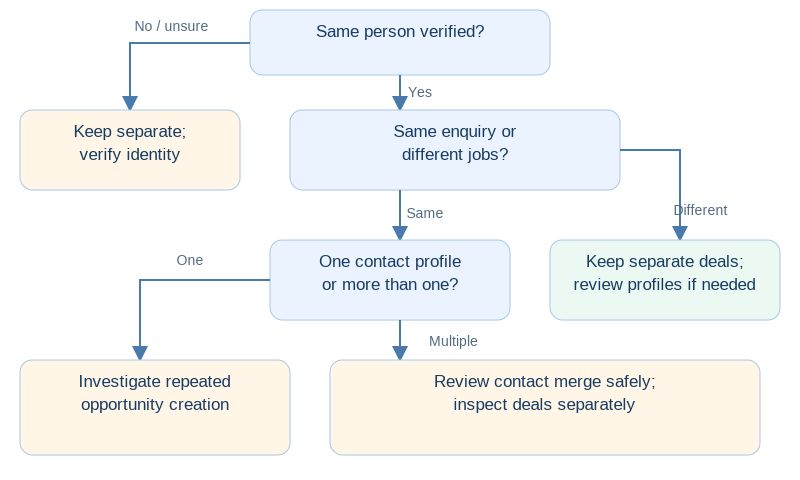
| What you see | Recommended decision | What to verify first |
|---|---|---|
| Two contact profiles for the same confirmed individual and the same enquiry | Consider contact merge after review | Which details and history should survive? |
| One contact, two independently requested services | Keep both opportunities | Each has its own scope, value, and next step |
| One contact, two cards created for the same submission | Investigate duplicate deal creation | Trigger history, timestamps, and source event |
| Two people with the same name | Keep separate | Identity, not spelling similarity |
| A couple using one shared email | Investigate; do not auto-merge | Who submitted, who owns the job, and who receives messages |
| A property manager requesting work at two addresses | Usually keep separate deals | Separate work orders and property references |
| An existing customer returning months later | Keep historical work; evaluate a new deal | A new purchase versus an update to the previous request |
| Two cards in different pipelines | Investigate the intended process | Deliberate handoff versus duplicated revenue tracking |
| A test enquiry mixed with real customer records | Isolate and review | Confirm it is truly test data and not linked to live work |
Try this now: choose one suspicious pair and write a one-sentence explanation of why it is a duplicate. “The names match” is not sufficient. “These two cards came from the same enquiry reference and represent the same quoted work” is a much stronger starting point.

3. A roofing example: one customer, two valid jobs
Meet Alex Morgan, a fictional homeowner. Alex asks for a roof-cleaning estimate for 12 Cedar Lane. A week later, Alex separately requests gutter cleaning at the same property. For a related example of handling roofing enquiries and pipeline stages, see GoHighLevel for roofers.
Your intended structure could be:
- One contact: Alex’s verified communication details.
- Opportunity A: Roof cleaning, enquiry R-104, estimate awaiting approval.
- Opportunity B: Gutter cleaning, enquiry G-208, inspection not yet arranged.
Both deals are legitimate. Moving the roof-cleaning opportunity to “Won” should not tell the gutter-cleaning team that its work is booked.
Now change the example. Alex presses Submit twice because the thank-you page loads slowly. Both cards contain roof cleaning, the same property, and the same request. That is a candidate for duplicate-deal investigation, not a reason to create two customer profiles.
Suggested naming convention: Customer · Service · Property/reference. For example, Alex Morgan · Roof cleaning · R-104. Clear names help people review records; they do not, by themselves, enforce duplicate prevention.
What if roof and gutter cleaning are sold as one package?
Then one opportunity may be the better model, with the package scope recorded clearly. Decide whether the business is pursuing one combined sale or two independent sales. Do not let a form’s checkbox count make that decision accidentally.
4. Before you merge contacts in GoHighLevel
Important: contact merges cannot be undone. HighLevel’s current guide describes manual merging through Contacts → Smart Lists → select records → More → Merge. Choose a master and review conflicting values before confirmation. Its Manage Duplicates tool is admin-only and can suggest matches by email, phone, or name; a suggestion is not proof of identity.
Existing custom-field values on the master are not overwritten by another record’s values. The documentation also flags special handling for appointments and financial records. Active workflow execution can transfer, and an extra execution of the same workflow may stop. Review those dependencies rather than assuming everything will combine harmlessly. Official merge instructions and data-retention details.
Prepare a small change record
Before touching a real customer, record:
- The affected contact IDs and why you believe they identify the same person.
- The chosen survivor and the details your team trusts.
- Deal references, owners, stages, and values that need checking afterward.
- Appointments, active messages, external systems, and financial records needing review.
- Who approved the change and who will validate it.
Keep this information in an access-controlled location. An export can help you compare selected data, but do not treat a contact CSV as a complete backup or a merge undo button.
Choose a master deliberately
The newest profile is not automatically the best one. Compare verified contact details, current ownership, and the records your team uses operationally. If two profiles disagree about an email address, ask which one is current rather than selecting the record with the most filled-in fields.
If opt-out or communication-preference information conflicts, stop and resolve it. A cleanup exercise should never be used as a reason to restart outreach that the person did not want.
Start with a controlled example
If your team has never used merging, rehearse on clearly labelled test records with no real messages, appointments, or payments. Then review one verified live pair with the responsible owner before considering a larger cleanup. Do not experiment with the customer who has an inspection starting in five minutes.
5. What to do with duplicate opportunities
Do not assume that merging contact profiles also decides which deals are valid. Review each opportunity separately after any contact cleanup.
For an apparent duplicate deal, compare the enquiry reference, property, scope, value, creation time, owner, and next action. Then identify the authoritative record with the team member managing the sale.
My recommended cleanup sequence is:
- Find the cause first. Identify the workflow, integration, or manual action that created the extra card.
- Protect the real deal. Make sure the authoritative record has the required business context.
- Review downstream effects. Check messages, tasks, reporting, and external references that might depend on either record.
- Choose an approved cleanup action. Use the controls actually available in your account. Do not assume a contact-merge tool is an opportunity-merge tool.
- Reconcile the result. Check the remaining deal and repeat the original intake scenario safely.
Avoid marking an accidental duplicate as “Won” or “Lost” merely to remove it from the open board. Those statuses should describe a real sales outcome. If your organisation uses a dedicated cleanup classification, define how reports treat it before applying it.
Pause before deletion: if a record has payment, invoice, appointment, integration, or disputed ownership implications, escalate to your account administrator. This guide is not a recommendation to bulk-delete deals.
6. Why duplicates keep coming back: 12 diagnostic cases
Use the table to trace a cause, not to guess a universal fix. Test changes with controlled data and safe delivery settings. For broader issues with workflow entry, branching, and repeated actions, review our GoHighLevel workflow troubleshooting checklist.
| Symptom | Check | Suggested correction | Retest |
|---|---|---|---|
| Two deal cards appear after one form submission | Are two workflows handling the same form? | Give one process responsibility for creating the deal | One submission; inspect both workflow histories |
| Duplicates appear when someone retries a form | Does each submission create a new sale? | Define when an existing enquiry should be updated | Submit the same request twice |
| Website and integration each create a card | Are both native and external routes active? | Choose the intended creation route | Send one controlled event through the real path |
| Same customer has two contact IDs | Which identifier did each intake route receive? | Standardise required data and matching rules | Compare contact IDs across both entry paths |
| Duplicate prevention is enabled but a card still appears | Are the cards linked to different contact IDs? | Investigate contact identity as well as deal creation | Test matching and non-matching identity examples |
| A returning customer cannot get a new deal | Is prevention blocking legitimate repeat business? | Separate repeat-sale rules from retry rules | Test old completed work plus a genuinely new request |
| A deal at another property is updated | Is lookup based only on customer or latest card? | Add request/property-specific criteria | Create two test jobs; update only the intended one |
| A follow-up goes out twice | Are there two sending workflows or two active deal journeys? | Define message responsibility and suppression conditions | Trace both message sources, not just contact count |
| An integration retry creates another deal | Does the retry reuse a stable source reference? | Add retry-safe handling in the integration design | Replay the same event, then submit a different event |
| Duplicates reappear after staff cleanup | Can staff and automation both create the initial card? | Write a clear intake ownership rule | Have a teammate follow the revised procedure |
| Records appear inconsistent after an import | Were identifiers or fields missing/mapped incorrectly? | Review a small sample and import results | Import a controlled sample before the full file |
| A stage change starts repeated processing | Does the workflow update a field that triggers another route? | Tighten entry conditions and document intended re-entry | Follow the complete chain of updates |
A useful distinction: duplicate contacts versus duplicate messages
Two messages do not prove two contacts exist. Start with the message source and execution history. If one profile is enrolled in two legitimate deal journeys, you may need communication coordination rather than identity cleanup.
For example, Alex should not receive a generic “We received your enquiry” twice for one submission. But a roof-cleaning estimate and a separately requested gutter-cleaning appointment can require different messages. Make each message specific enough that the customer knows which job it concerns.
7. How to prevent duplicate contacts in GoHighLevel
HighLevel documents contact matching under Settings → Business Profile → Contact Preferences. Review Allow Duplicate Contacts and the primary/secondary email or phone preferences. The secondary preference acts as a fallback when the primary does not find a match; it is not a requirement that both match. CSV imports follow their own matching behaviour rather than simply obeying this toggle. Official contact deduplication preferences.
My implementation recommendation is to document the intake data contract:
- Which identifying details must every form collect?
- How are phone country codes captured consistently?
- How does the team handle shared inboxes or family phone numbers?
- Which system is responsible for creating or updating the contact?
- What happens when email points to one person and phone points to another?
Route conflicting identity information to review. Do not make up a placeholder email merely to satisfy a required field; several people sharing the same fake address creates another matching problem.
Try this test: submit one enquiry using a verified test email, then repeat it with a changed name spelling but the same email. Separately test a new person with a different email. Check IDs and field changes—not just whether the submission succeeded.
8. Build a find-before-create opportunity workflow
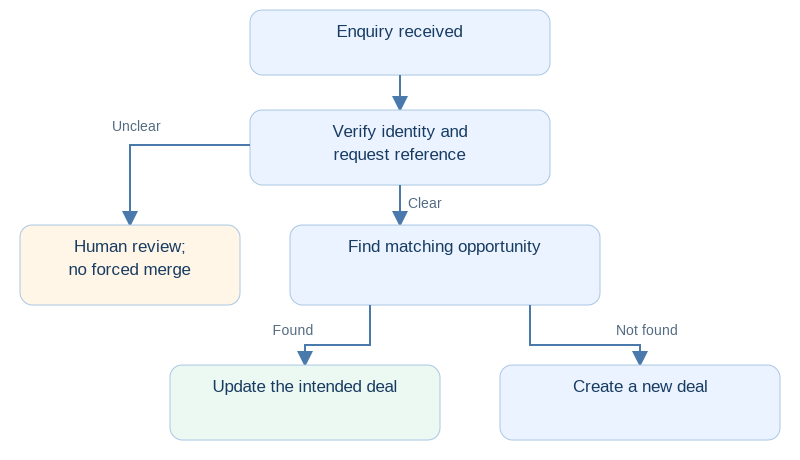
The following is a suggested design, not a ready-to-import snapshot or a guarantee against simultaneous events. For help reviewing duplicate opportunity creation and workflow logic, explore our GoHighLevel workflow optimization services.
HighLevel’s Find Opportunity action searches the triggering contact’s opportunities using filters combined with AND logic. It returns one matching result, earliest or latest as configured, and offers found/not-found paths. This means a broad lookup can select one record even when several are plausible. Find Opportunity documentation.
Define “same enquiry” before configuring the lookup
For our fictional roofing business, use a stable request reference where the intake system supplies one. Otherwise agree on a carefully tested business rule using available fields, such as service and property. Be cautious: the same person can request the same service at the same property again next year.
Do not use a permanent customer-level tag as your only proof that a particular job already exists. It can unintentionally block future business.
Make each branch intentional
- Matching request found: update only the information that belongs to this enquiry; do not reset an advanced deal to New Enquiry by default.
- No matching request found: create a new opportunity after identity and request checks.
- Identity or request unclear: assign a review task through your chosen process instead of forcing a merge.
The Create Opportunity action’s duplicate logic uses contact ID rather than opportunity name. Turning duplicates off can prevent another opportunity for an already-linked contact, so test the intended repeat-customer behaviour. Create Opportunity documentation.
The Update Opportunity action needs an opportunity context from a relevant trigger or lookup. Creating a record earlier in a workflow does not automatically supply that context; verify the target before later updates. Update Opportunity documentation.
What this design does not guarantee
A lookup followed by creation is not necessarily an atomic lock. Two near-simultaneous requests could both reach a not-found decision before either creates a record. For higher-risk integrations, ask your implementer about stable event IDs, retry handling, and controls against concurrent creation in the relevant system.
Do not promise “zero duplicates” because a diagram contains a Find step. Prove the behaviour with repeated and closely timed test events.
9. Spot the mistake before it reaches a customer
Alex has two open jobs. A roof estimate is approved.
Update the latest card
Find Alex’s most recently created opportunity and mark it Won.
Identify the approved request
Locate the opportunity for roof-cleaning enquiry R-104 and update that specific deal.
Reveal the safer approach
Option B. The latest card may be the gutter-cleaning enquiry. Match the approved request, confirm the target, then apply the update. If the request reference is missing or ambiguous, send it for review rather than guessing.
10. A practical acceptance test checklist
Use these checks in a test environment or a carefully controlled live test with authorised recipients. The checkboxes below are temporary reading aids; they do not change your CRM or save results.
Record the evidence, not just “passed”
For each test, note the input, expected contact/deal count, actual IDs, workflow path, and message outcome. Record the tester and date. That gives the next person something more useful than “the automation looked fine.”
Example acceptance criterion: “Replaying enquiry R-104 does not create another roof-cleaning opportunity, while a new gutter-cleaning enquiry G-208 remains a distinct deal for the same customer.” This is an intended result to test—not a claim about an implementation already running.
11. After cleanup, check the business outcome
Do not stop at a lower contact count. Ask the responsible team member to confirm that the correct customer details, valid jobs, owners, next actions, appointments, and communication preferences remain usable.
Then compare the affected pipeline view with your expected result. If two accidental copies carried the same estimated value, the cleaned view should no longer represent both as separate live sales. If the two jobs were legitimate, their individual value and status should still be visible.
Finally, repeat the entry path that caused the problem. A one-time cleanup without a source correction is unfinished work.
12. Frequently asked questions
Should I merge contacts just because the names match?
No. Treat a name match as a reason to investigate. Shared names, family details, and business inboxes require context. If identity is uncertain, keep the records separate while you verify.
Can one contact have multiple opportunities in GoHighLevel?
Yes. Use the documented account setting and design your workflow rules around legitimate separate deals. A repeat customer is not inherently a duplicate problem. See the multiple-opportunity reference in section 1.
Does changing a duplicate setting clean up existing records?
Do not use a prevention setting as a substitute for reviewing existing data. In particular, HighLevel states that turning off multiple opportunities does not delete existing opportunity cards. Review current records separately. See the official multiple-opportunity guidance.
Will merging contacts fix duplicate follow-up emails?
Not necessarily. Investigate which processes send the emails. You may have two workflow routes sending about the same job even after the contact data has been reviewed.
Should I always choose the latest opportunity?
No. “Latest” is a sorting decision, not proof that the card is the right job. Choose sufficiently specific filters and test the customer-with-two-jobs scenario.
Should I automate merging immediately?
Start by proving your identity rules and reviewing exceptions manually. An incorrect match can be more damaging than a visible duplicate. Keep uncertain cases out of any automatic merge process.
Considering GoHighLevel for your team?
If you are evaluating the platform for this process, review its current plans and features against your requirements before choosing. A subscription still needs configuration, connected services, and testing for your business.
Still need help with duplicate records or pipeline automation?
About the author: Mohan Singh works with GoHighLevel, CRM workflows, and business automation.
Official references
Use these for current platform instructions. The workflow design, fictional examples, and acceptance checklist above are implementation recommendations rather than claims of tested results.