
GoHighLevel Missed Call Text Back: Setup, Follow-Up, and Duplicate Message Fixes
Author - Mohan Singh | GoHighLevel CRM, Workflows
November 23, 2026

A homeowner calls your business while the team is on another job. Nobody answers. A short text gives the caller a way to explain what they need.
That is useful. Three identical texts after three calls in two minutes are less useful—especially if nobody then takes responsibility for the callback.
GoHighLevel missed call text back should acknowledge an eligible missed caller, create a clear next step, and avoid conflicting messages. Start by choosing who sends the acknowledgement: the built-in feature or a deliberately configured workflow. Then test the call outcome, message delivery, repeated calls, and human follow-up separately.
This guide includes setup instructions, a proposed workflow, sample messages, 16 troubleshooting cases, and a launch checklist. Examples and diagrams are illustrative, not screenshots or results from a client account.
1. What missed call text back does—and what still needs an owner
HighLevel’s Missed Call Text Back guide describes an automatic SMS response to missed inbound calls. It also notes that repeated missed calls can each trigger a message. The native feature respects DND and can select an eligible alternative sending number when necessary.
A text does not mean the customer has been helped. Your team still needs to read replies, call back when appropriate, handle existing customers, and close the loop.
| Outcome | What to verify |
|---|---|
| Call recorded | Correct direction, number, contact, and outcome |
| Acknowledgement attempted | The intended sender path produced the SMS |
| Message delivered | Inspect delivery status and the controlled receiving phone |
| Reply received | The conversation reaches the responsible person |
| Callback owned | A named team member or queue has the next action |
| Request resolved | Staff record what happened and stop unnecessary follow-up |
A caller may want a quote, an update on existing work, or help with a complaint. Do not automatically treat every missed call as a new sales opportunity.
2. Choose the built-in feature or a workflow
| Need | Suggested approach | What to check |
|---|---|---|
| A basic acknowledgement after a missed call | Built-in feature | Whether its repeat-call behaviour suits your business |
| Different wording by line or business hours | Workflow design | Number filters, time zone, business-hour rules, and fallback |
| A defined repeat-message interval | Workflow design | Eligibility checks, re-entry, cleanup, and overlapping senders |
| Callback tasks and staff alerts | Supporting workflow | Avoid duplicating the acknowledgement if the native feature sends it |
| Complex routing across services | Workflow design | Clear ownership and tested exception paths |
It is possible to use the native acknowledgement with a workflow that only assigns tasks or notifies staff. The important rule is one intentional owner for each customer-facing message.
Before enabling anything, inventory existing call workflows, native text back, AI follow-up, external integrations, and staff templates. A new automation can duplicate an older one even if its own logic is correct.

3. Configure the basic missed call text back
In the relevant sub-account, open Settings → Phone System → Voice → Voicemail & Missed Call Text Back. Enable the feature, customise the message, send a preview test, and save. Interface labels can change; consult the official setup instructions if your screen differs.
Use a short message that names the business and offers one clear next step. Do not rely on a first name being available for a new caller.
A preview checks the message, not the entire call journey. Also make a controlled unanswered call to the actual business number and inspect the recorded outcome and received SMS.
Decide your ring and voicemail behaviour
Review the actual routing: staff phones, forwarding, voicemail, IVR, and Voice AI where used. Choose a timeout that gives the team a reasonable chance to answer and works with the intended voicemail route. There is no universally correct timeout for every business.
If an external voicemail system answers before the intended route finishes, the call outcome may differ from what you expected. Check the call record instead of assuming “nobody in the office answered” means the platform recorded a missed call.
HighLevel’s phone configuration guide covers routing and timeout settings. Its Call Connect guidance describes an optional acceptance step useful for some externally forwarded calls. Test whether it fits your route; do not enable it blindly.
4. Build a workflow when you need more control
The following is a suggested design, not an importable snapshot or a guarantee that one recipe covers every call route. If you need help diagnosing call-based triggers, message suppression, and follow-up logic, explore GoHighLevel workflow optimization services.
Start with the Call Details workflow trigger. Restrict it to incoming calls and the intended business line or number pool. Select qualifying recorded outcomes based on your test calls and business policy. Do not include all completed or outgoing calls simply to make enrollment happen.
HighLevel documents direction, status, number, and other filters in its Call Details trigger guide.
| Step | Intended behaviour | Decision to make |
|---|---|---|
| 1. Qualifying call event | Enter only for the agreed incoming outcomes | Which lines and outcomes should qualify? |
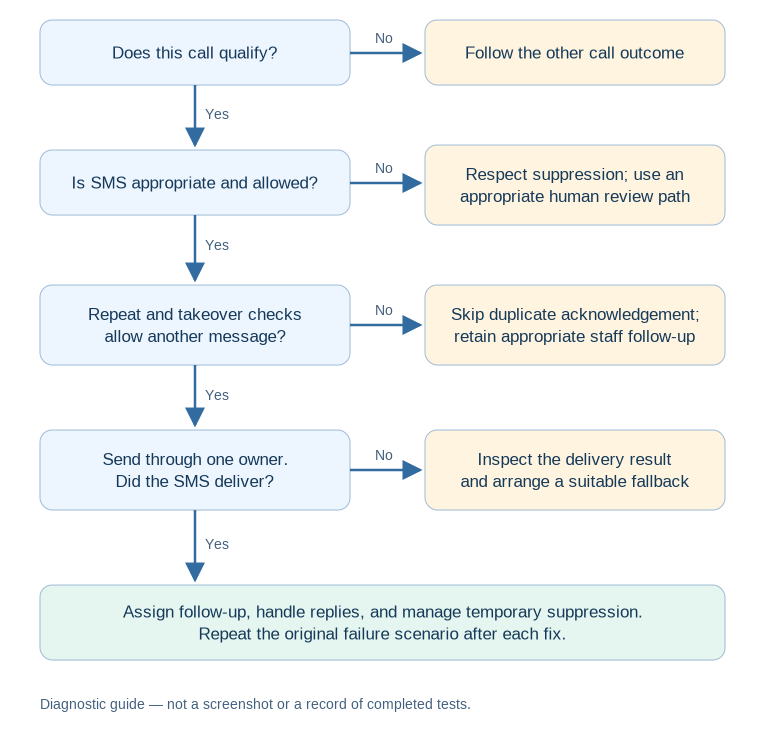
| 2. Eligibility | Respect channel restrictions and exclude inappropriate messages | Is a customer acknowledgement appropriate now? |
| 3. Repeat-message check | Avoid another acknowledgement within the chosen interval | What identifies the same caller and interval? |
| 4. Send acknowledgement | Identify the business and offer a useful response path | Which sender and wording apply? |
| 5. Assign follow-up | Create or update the agreed callback work | Who owns it, including after hours? |
| 6. Handle response or takeover | Let staff continue without contradictory automation | What suppresses later customer messages? |
| 7. Release temporary suppression | Permit a future genuine enquiry under the policy | How and when does temporary state expire? |
Set ownership and failure handling independently of SMS delivery. A caller whose text cannot be delivered may still need a callback, subject to their communication preferences and the business process.
Follow the evidence to the failing step
5. Prevent duplicates with a rule, not just a delay
A delay postpones an action. It does not necessarily decide whether another run should send the same message. If two independent paths wait and then both send, the customer still receives two messages. For related execution and duplicate-message diagnostics, review our GoHighLevel workflow troubleshooting checklist.
Choose a policy before choosing a mechanism. For example: one missed-call acknowledgement per caller during a 30-minute interval, with later calls recorded for staff review. Thirty minutes is an illustrative operating choice, not a platform default or universal recommendation.
Two implementation patterns to evaluate
Keep the contact in a short workflow while the interval runs. For a suitable contact-based workflow, active-enrollment behaviour can help limit repeated entry. Review the actual re-entry settings and test your trigger. If an early exit removes the contact, it can also remove the protection you were relying on.
Use a dedicated temporary marker or timestamp. Check it before sending, set or update it at the appropriate point, and define its expiry or removal. Document what happens if the message fails or the contact exits early.
Neither pattern automatically coordinates a native sender, another workflow, and an external integration. HighLevel also documents race conditions between workflow actions. A simple “check tag, then add tag” sequence should not be presented as an atomic lock against simultaneous events.
For high-concurrency or externally orchestrated implementations, have the implementer design and test deduplication using the event and contact context available. The acceptance criterion is the observed number of messages—not the presence of a tag in the builder.
Test the cleanup as carefully as the suppression
If a reply exits the workflow before a temporary tag is removed, that tag may block future legitimate follow-up. If the tag is removed immediately on a reply, a repeated call may generate an acknowledgement while a staff conversation is already active.
Separate two questions: “Is the repeat-message interval over?” and “Is this person already being helped?” Define both outcomes in the process and test them. See workflow settings and the Wait action guide for the controls available in your account.
6. Write messages that match the situation
The examples below use writing placeholders, not guaranteed merge-field syntax. Replace them with approved business information, use supported fields where appropriate, and check the final rendered message including sender identification and opt-out wording.
| Situation | Example text |
|---|---|
| General missed call | Hi, this is [Business Name]. Sorry we missed your call. What can we help you with? Reply here and our team will review your message. Reply STOP to unsubscribe. |
| Roofing enquiry | Thanks for calling [Business Name]. Sorry we missed you. Is your enquiry about a new roofing job or existing work? You can reply here. Reply STOP to unsubscribe. |
| Outside staffed hours | Thanks for calling [Business Name]. Our team is currently offline. We review messages during [Hours and time zone]. Please reply with what you need. Reply STOP to unsubscribe. |
| Booking option | Sorry we missed your call to [Business Name]. You can reply with your question or view available consultation times here: [Booking link]. Reply STOP to unsubscribe. |
Use an after-hours message only when your logic actually selects that condition. With one general native message, avoid statements that become false at other times of day.
A booking link is an invitation, not a confirmed appointment. Do not write “your appointment is reserved” until the booking system has established that outcome.
Avoid promising a callback in five minutes unless someone is accountable for meeting that promise. For support lines, route existing customers appropriately instead of forcing every reply into a sales sequence.
HighLevel’s SMS settings guidance explains sender identification and opt-out handling. Preview the final message so automatic additions do not produce confusing or repeated text. A missed call should not be treated as blanket permission for unrelated promotional campaigns.
7. Give the human follow-up a clear owner
A useful internal notification can say:
Missed inbound call on [Business line] at [Time and time zone]. Contact: [Record link]. Please review the conversation and call outcome before contacting the customer. Assigned to: [Owner]. Next action: [Callback or reply].
Choose how to handle repeated calls: update an existing callback task or create a new one only when the process needs it. Do not silently create a task for every ring if that floods the team’s queue.
| Customer outcome | Suggested next action |
|---|---|
| Replies with a new enquiry | Assigned person reviews and qualifies it |
| Replies about existing work | Route to the existing relationship or support owner |
| Books through the supplied link | Verify the appointment and stop inappropriate chasing |
| Staff complete the callback | Record the outcome and suppress unnecessary nudges |
| Does not reply | Follow the agreed callback policy; do not default to endless texts |
| SMS fails | Inspect the error and use an appropriate human fallback |
A workflow’s Stop on Response setting should not be assumed to stop every other workflow or recognise every form of human takeover. Document the stop rules across the processes actually sending messages, then test them.
8. Troubleshooting: 16 cases to check
No message arrives
| Case | Check | Fix if confirmed | Retest |
|---|---|---|---|
| 1. No call record in the intended account | Dialled number, routing, and destination account | Correct the route or inspect the correct account | Call the published number from a controlled phone |
| 2. Native feature is off or workflow is draft | Which sender owns the acknowledgement and whether it is active | Activate only the intended, tested path | Repeat a qualifying missed call |
| 3. Call outcome does not match the intended event | Recorded status and voicemail/forwarding behaviour | Correct routing or filters to match the agreed policy | Test no answer, voicemail, and human answer separately |
| 4. Trigger excludes the number or direction | Incoming/outgoing and line or pool filters | Correct unintended exclusions | Test one included and one excluded line |
| 5. Contact is SMS-restricted or opted out | Channel DND and opt-out state | Respect suppression and route appropriate work for review | Confirm a suppressed contact does not receive the SMS |
| 6. Recipient cannot receive the message | Number validity, messaging capability, and delivery error | Correct verified data or choose an appropriate fallback | Use a controlled SMS-capable recipient |
| 7. Sending service reports an eligibility or limit issue | Exact error and relevant number/account status | Resolve the stated sending issue | Retest delivery; do not repeatedly resend blindly |
| 8. The workflow is waiting or took another branch | Enrollment, wait, condition, and exit history | Correct the specific logic or expectation | Observe the complete execution through the expected send time |
Consult HighLevel’s SMS delivery error guide and DND documentation. A queued or attempted message is not proof of receipt.
Too many messages, wrong wording, or broken follow-up
| Case | Check | Fix if confirmed | Retest |
|---|---|---|---|
| 9. Native feature and workflow both send | Match each message to its sending path | Keep one acknowledgement owner | One missed call produces the intended count |
| 10. Repeated calls each trigger acknowledgement | Native behaviour or workflow repeat policy | Use the selected suppression design if required | Call three times within the interval and once afterward |
| 11. Two workflows or an integration overlap | All enrollment and message timestamps | Remove or coordinate the duplicate path | Repeat the original sequence |
| 12. Delay was used without duplicate prevention | Whether multiple paths are waiting to send | Add an explicit eligibility rule; review active runs | Wait through the full delay and count received messages |
| 13. Reply or takeover does not stop later nudges | Each sending process and its exit condition | Implement the agreed response/takeover stop logic | Reply before the next scheduled message |
| 14. Temporary suppression never clears | Marker cleanup and early exit paths | Correct expiry and exception handling | Test a later legitimate enquiry |
| 15. Business identity, name, or hours are wrong | Rendered text, missing fields, and time-zone branch | Use correct values and safe fallback wording | Test a new caller and an after-hours call |
| 16. SMS works but nobody handles the response | Conversation assignment, task owner, and notifications | Assign a responsible person and fallback | Reply from the test phone and verify staff receipt |
Use Execution Logs and Enrollment History to identify a workflow’s path. Do not assume every automated SMS came from the workflow currently open on your screen.
9. Example: three calls, one useful acknowledgement
Illustrative roofing scenario. The proposed policy is one acknowledgement per caller in a 30-minute interval, plus a single owned callback task. This is custom behaviour to implement and test—not an assumed native default. For a separate example of routing inbound calls to AI assistance and human follow-up, see the HVAC AI receptionist guide.
| Time | Event | Intended outcome |
|---|---|---|
| 10:00 | First qualifying missed call | One acknowledgement; callback ownership established |
| 10:02 | Same caller tries again | Call recorded; no second acknowledgement under the policy |
| 10:04 | Caller replies about roof cleaning | Assigned team member receives the conversation |
| 10:08 | Team member calls back and discusses the work | Outcome recorded; further generic nudges suppressed |
| After the repeat interval | Temporary repeat-call state expires | Future eligibility depends on current conversation and business rules |
If the same person calls again the next day about a new issue, do not leave them permanently blocked by an old temporary tag. If they call while a staff member is actively resolving the same request, do not restart generic lead chasing automatically.
Existing customer example
A customer calls about an appointment already booked. The text should invite their question and route to the relevant team. Creating another sales opportunity or sending a new-booking pitch may be the wrong next step.
Voice AI example
If Voice AI answers, inspect the recorded call outcome and the conversation result. “AI answered but did not solve the request” is a different condition from “no one answered.” Give unresolved AI calls their own appropriate handoff instead of assuming the missed-call trigger will catch them.
10. Test before launch
Run real controlled phone scenarios, not just an SMS preview. Check the call record, outgoing message, receiving phone, staff notification, and any temporary state.
| Test | Expected evidence |
|---|---|
| Unanswered incoming call | Intended event and one appropriate acknowledgement |
| Human answers | No incorrect “sorry we missed you” response |
| Voicemail route | Recorded outcome and follow-up match the policy |
| Three rapid calls | Message count matches the chosen repeat-call rule |
| Call after suppression expires | Eligibility restored when appropriate |
| Reply before a later nudge | Unnecessary follow-up stops as designed |
| Human callback before later automation | Takeover prevents contradictory messaging |
| SMS DND contact | Applicable SMS suppression is respected |
| Invalid or non-SMS-capable recipient | Failure is visible and handled appropriately |
| After-hours call | Accurate expectations, time zone, and next owner |
| Different business line | Correct brand, team, and message rules |
| Existing customer | Relevant support route, not automatic new-lead chasing |
| Early workflow exit | Temporary suppression does not remain indefinitely |
| Booking through a link | Actual appointment is verified before booking follow-up changes |
Keep a register of input, expected outcome, actual outcome, evidence, and pass/fail/blocked status. Observe the full delay and suppression interval; an immediate test cannot prove what will happen later.
11. Measure useful outcomes
Track missed-call events separately from unique callers. Otherwise repeat callers can distort how you interpret the results.
Useful measures include eligible callers acknowledged, message delivery outcomes, replies, time to human follow-up, unresolved callback tasks, duplicate-message incidents, and verified bookings associated with the follow-up process.
Define the denominator and time window for each measure. For example, “reply rate” could mean unique recipients who replied within the agreed observation window divided by unique recipients with delivered acknowledgements. Keep that definition consistent.
Do not attribute every later booking to the text back alone. A staff callback, an existing relationship, or another channel may have contributed. Use the data to improve the process without inventing conversion claims.
12. Frequently asked questions
Is missed call text back the same as Voice AI?
No. A missed-call acknowledgement follows a qualifying call outcome. Voice AI handles a conversation. They can be parts of one process, but they need distinct routing and follow-up rules.
Will adding a Wait step stop duplicates?
Not by itself. A wait changes timing. You also need a tested rule governing which executions can send, including any other native or external senders.
Should I turn on both the native feature and a workflow?
Only with a deliberate division of responsibility. For example, native acknowledgement plus workflow-created callback tasks. Avoid having both send the same customer message.
Why did the SMS arrive from another number?
The native feature can use an eligible alternative sender. Check the actual number and make the business identity clear. Do not assume a custom workflow follows exactly the same sender-selection logic.
Does this guarantee a callback or booking?
No. Acknowledgement is one step. Staff ownership, customer intent, availability, and follow-through determine what happens next.
Can I use this for every phone system or country?
Verify your actual phone integration, call-event visibility, number capabilities, and messaging eligibility. A setup described for one account should not be assumed to work unchanged everywhere.
Considering GoHighLevel for your team?
If you are evaluating the platform for this process, review its current plans and features against your requirements before choosing. A subscription still needs configuration, connected services, and testing for your business.
Still need help with missed-call follow-up?
About the author: Mohan Singh works with GoHighLevel, CRM workflows, and business automation.