
GoHighLevel for Roofers: Connect Enquiries, Estimates, and Follow-Up
Author - Mohan Singh | GoHighLevel CRM, Workflows
October 22, 2026
A homeowner submits your roofing enquiry form. The page displays a thank-you message. But who receives the enquiry? Who calls the homeowner? And if an estimate is sent, what makes sure it is followed up?
Those questions are where a landing page becomes useful to the business. A clear page can explain the service and collect interest. The process behind it should give every valid enquiry an owner, an accurate status, and a next action.
This guide explains how a roofing business can connect its landing page, enquiry form, CRM, and estimate follow-up. The pipeline stages, messages, and automation below are a proposed implementation plan that you can adapt to your own operation.
The workflow described here requires its own configuration and testing. At the end, you can also watch my roof-cleaning landing-page video and explore an optional ready-made template. That template is a starting point for the page, form, and email setup—not the complete automation system described in this guide.
1. Start with the service and the homeowner's next decision
A roof-cleaning enquiry is not the same as a roof-replacement enquiry. Before writing the page, decide what the visitor is being invited to request.
| Service | Useful first action | What still needs checking |
|---|---|---|
| Roof cleaning | Request an assessment or quote | Location, property access, service suitability, and pricing process |
| Roof repair | Describe the concern and request a callback | Scope, urgency, coverage, and whether a site visit is required |
| Roof replacement | Request an inspection or estimate discussion | Property details, project timing, and the contractor's assessment process |
| Gutter or exterior cleaning | Request the relevant service | Area served, access, service details, and scheduling |
Match the headline, form, and follow-up message to that action. If the page promises a quote request, the thank-you page should not claim a visit has already been booked.
Example headline: “Roof Cleaning in [Service Area] — Request a Quote.”
Supporting copy: “Tell us about your property and the service you need. Our team will review the details and contact you about the next step.”
Replace the placeholders with the actual business information. Use “free quote” only if that accurately reflects the contractor's policy.
2. Give each landing-page section a job
A useful long-form service page can include contact details at the top, an opening offer and form, reasons to choose the service, imagery, repeated buttons, a process explanation, reviews, related services, and FAQs.
Help a homeowner decide.
Then make enquiring easy.
Suggested service-page structure. This is an illustration, not a screenshot or package inventory.
A specific offer.
A clear next step.
Relevant project imagery and a concise explanation of the service.
Here is how to make those sections useful rather than decorative:
| Section | Question it should answer | Practical improvement |
|---|---|---|
| Logo and phone number | Who am I contacting? | Show the correct company identity and a working call link |
| Headline and service area | Is this the service I need, where I live? | Name the specific service and geographic coverage |
| Opening form | How do I enquire? | Ask for enough information to start a useful conversation |
| Reasons to choose the business | Why should I consider this contractor? | Use specific, verifiable facts rather than generic superlatives |
| Project photographs | What kind of work does the business do? | Use authorised photos of actual work; label illustrative images |
| Customer reviews | What have customers experienced? | Use genuine feedback with permission and accurate attribution |
| Three-step process | What happens after I submit? | Explain the actual enquiry, assessment, and scheduling sequence |
| Services and FAQs | Is my situation covered? | Address coverage, quoting, access, and common customer questions |
| Final call to action | How do I take the next step? | Link to the correct form or verified booking route |
A repeated button should make the next step convenient. It should not send the visitor to a different offer unexpectedly. Check every button on the published mobile page as well as the desktop version.
Use genuine project photos and testimonials where available. A template's review section is a place to add your evidence; example reviews must not go live as if they belong to your business.
3. Build a form that helps the first conversation
The first form does not need to collect every detail required to price a job. It should help the office identify the request, contact the homeowner, and decide the next step.
| Field | Why it helps | Suggested treatment |
|---|---|---|
| Name | Personal follow-up | Required |
| Phone or email | A usable contact route | Require the route your process needs; explain how it will be used |
| Postal code or service area | Initial coverage check | Required where geographic coverage determines eligibility |
| Service needed | Correct routing | Use a short list of the services actually offered |
| Brief description | Context for the first call | Keep it short; let people describe the problem in their own words |
| Preferred contact time | Easier coordination | Optional; make clear that a preference is not a booked appointment |
| Property address | Assessment and scheduling | Collect upfront if essential, otherwise during qualification |
| Property photos | Context before a visit | Optional if supported; never require unsafe access to obtain them |
If a homeowner reports a leak, save “homeowner reports a leak.” Do not turn that description into a confirmed diagnosis or a repair quotation.
An enquiry acknowledgement and an ongoing promotional campaign serve different purposes. Configure the channel permissions and opt-out handling appropriate to your business before enabling messages.
Example qualification conversation:
- “Which service are you looking for?”
- “What is the property's address or postal code?”
- “Can you briefly describe what you want us to look at?”
- “Are you the owner, or the person authorised to arrange the work?”
- “When would you prefer us to contact you?”
- “Have we already sent an estimate or arranged a visit for this property?”
That final question helps avoid treating an existing request as a brand-new job.
4. Connect submission to ownership and follow-up
The thank-you page is only the visible part of the submission process. Behind it, the request should reach the correct team member with enough information to act.
From enquiry to an informed decision
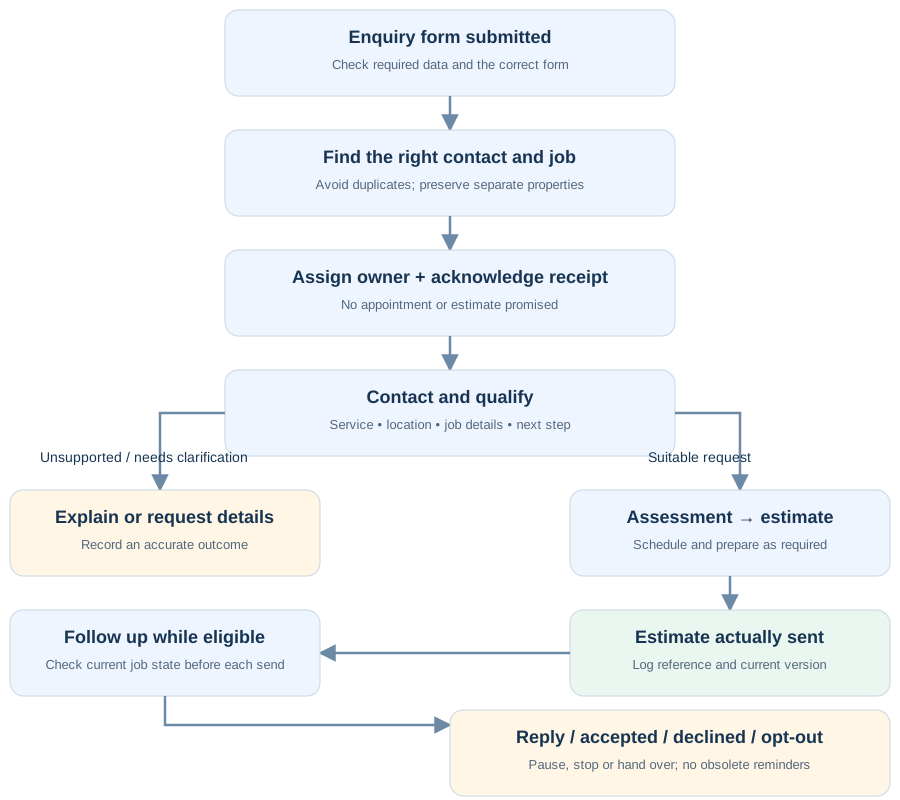
HighLevel's Form Submitted workflow trigger can start a workflow when a selected CRM form is submitted. Use the Form Is filter to identify the intended form. Its documentation also notes that repeated submissions can trigger the workflow again, so duplicate handling needs attention. Official form-trigger guide.
For this proposed implementation:
- Check the form and data. Confirm the service, contact route, and area information needed for the next action.
- Identify the right record. Find the relevant contact and determine whether this is the same job, a follow-up, or a different property. Do not assume one contact always means one opportunity.
- Create or update the appropriate enquiry. Put a new job in the correct pipeline stage; preserve existing job history.
- Assign responsibility. Choose a named owner or a defined assignment rule.
- Notify that owner and create the next task. A notification without responsibility can still leave an enquiry unattended.
- Acknowledge receipt. Use a permitted contact channel and accurate wording.
- Route exceptions. Missing details, unsupported services, and out-of-area requests need a deliberate next step.
These are implementation responsibilities, not a claim that purchasing a template automatically configures them.
Example internal notification:
New roof-cleaning enquiry
Name: [Customer name]
Contact: [Confirmed contact details]
Area: [Postal code]
Request: [Customer's description]
Status: New enquiry — no visit booked
Owner: [Assigned person]
Next action: Review coverage and contact the customer
Example thank-you-page message:
Thank you — we've received your enquiry. Our team will review your details and contact you about the next step. A visit or quote appointment is not confirmed yet.
Show that message only after a successful submission. Use a different success message if your actual journey includes a verified appointment booking.
5. Use pipeline stages that tell the team what to do
For a useful operating process, separate contact attempts from qualification.
A person who misses one call may still need the service. A person who answers may still be outside your service area. Neither event alone tells you whether the job is suitable.
| Proposed stage | Entry condition | Next action |
|---|---|---|
| New enquiry | A valid new request is captured | Assign and review |
| Contact attempted | A real attempt was made; no conversation yet | Follow the approved retry policy |
| Qualified enquiry | Service, location, and relevant job details are checked | Agree on an assessment or estimate step |
| Assessment scheduled | A real date and time are confirmed | Send the intended confirmation and prepare the visit |
| Estimate being prepared | Required assessment information is available | Assign estimate preparation |
| Estimate sent | The actual estimate was issued and logged | Check receipt and address questions |
| Decision pending | The customer is considering a valid estimate | Follow up within the agreed policy |
Use Won and Lost opportunity outcomes with clear internal definitions. For example, define whether “Won” means an accepted estimate or a signed agreement; apply that definition consistently. A job being won does not mean the work has been completed.
Record loss reasons such as out of area, unsuitable service, declined estimate, or no decision. Keep “couldn't reach yet” separate from “not interested.”
6. Build two different follow-up sequences
The first sequence helps establish contact. The second helps a customer evaluate an estimate already sent. Mixing them can produce messages that do not match the customer's situation.
Sequence A: enquiry received, conversation not yet completed
Acknowledgement after a valid submission:
Hi [First name], thanks for contacting [Business name] about [Service]. We've received your request for [Area]. Our team will contact you to discuss the next step. No visit is booked yet.
After an actual unanswered call:
Hi [First name], [Team member] from [Business name] here. I tried calling about your [Service] enquiry. Is there a convenient time for us to speak?
Do not send the second message unless a call attempt actually happened. An automation should not invent work your team has not performed.
A later check-in, if appropriate:
Are you still looking for help with [Service]? Let us know whether you'd like a callback or whether we should close this enquiry for now.
Use a business-approved contact window, spacing, and maximum number of attempts. Stop repeated outreach when the customer declines or opts out.
Sequence B: estimate issued, decision not yet recorded
Start this sequence only when the estimate has actually been sent. If another system creates estimates, define how that confirmed event reaches GHL. A form submission is not evidence that an estimate exists.
| Example timing | Purpose | Example message |
|---|---|---|
| After sending | Confirm delivery and invite questions | “Hi [First name], we've sent estimate [Reference] for [Service] at [Property]. Please let us know if you have questions about the scope.” |
| Two business days later | Check receipt | “Did you receive estimate [Reference]? I can arrange for our team to clarify anything you're unsure about.” |
| Five business days later | Help the decision | “Would it help to discuss the work included or the next steps for estimate [Reference]?” |
| At the genuine validity deadline, if one exists | Explain a real deadline | “Estimate [Reference] is valid until [Actual date]. Contact us if you'd like to discuss proceeding or need an updated estimate.” |
These timings are illustrative, not a tested conversion formula. Use the contractor's sales cycle and the customer's preferences. Do not invent limited availability, fake expiry dates, or automatic discounts.
Before every message, check that the estimate is still current, the job is not won or lost, no human conversation has superseded the message, and the contact remains eligible for that channel. A revised estimate should replace the old reference and stop outdated reminders.
7. Make stopping automation part of the design
A good sequence knows when to hand the conversation back to a person.
| Event | Expected behaviour |
|---|---|
| Customer replies with a question | Alert the owner and pause inappropriate automated nudges |
| Assessment is booked | Stop messages still asking them to arrange that same assessment |
| Estimate is accepted | Stop decision reminders and hand over to the fulfilment process |
| Estimate is revised | End or update the old sequence before starting the relevant new one |
| Customer declines or opts out | Stop the relevant outreach and respect the contact preference |
| Team handles the enquiry by phone | Update the record so scheduled messages reflect the conversation |
HighLevel's Stop on Response setting applies to communications from the particular workflow. It is not a universal stop switch for every other workflow or for manual conversations. Design explicit state checks and removal rules across overlapping sequences. Official response-setting reference.
Do not assume that a workflow ending means someone has taken ownership. A human handoff still needs a recipient and a next action.
8. Treat a template as a starting point
A ready-made landing page can save you from designing the layout from scratch. It does not, by itself, establish who owns an enquiry, how an estimate is issued, or when follow-up should stop.
The same applies to a form and email setup: check exactly what happens after submission. A receipt email is not an estimate-follow-up sequence, and a thank-you page is not a booking confirmation.
Before importing any template, confirm its current contents, delivery instructions, account requirements, usage rights, and support terms. Build and test any additional pipeline stages, assignment rules, calendars, integrations, and follow-up sequences your business needs.
HighLevel supports different ways to reuse assets. A snapshot can contain selected configuration such as funnels, forms, and workflows, but that does not mean every template package includes them. Check the actual package rather than assuming that everything supported by the platform is supplied. Official snapshot overview.
After importing, check:
- Company name, logo, phone number, service areas, and actual service offer.
- Contact details, form fields, notifications, and thank-you destination.
- Genuine photographs, authorised testimonials, FAQs, and policies.
- Domain, sending configuration, connected services, and account permissions.
- Assigned users, pipeline references, custom fields, and calendar destinations.
- Every message, delay, eligibility condition, and stop rule.
If you import or build outbound workflows, keep them inactive until their configuration has been reviewed and tested. Check recipients, message wording, and required connections before activation.
9. Test the full journey before paying for traffic
Use test contacts and controlled destinations. Inspect the customer-facing page and the records behind it; a thank-you message by itself does not prove the workflow succeeded.
| Test | Expected result | Evidence to inspect |
|---|---|---|
| Submit a valid enquiry on mobile | Submission succeeds and shows the correct next step | Form record, thank-you page, and field values |
| Use an unrelated form | Roofing workflow does not start accidentally | Trigger filters and execution history |
| Submit the same job twice | No unintended duplicate job or repeated message burst | Contact, opportunity, and workflow enrolments |
| Existing customer requests a different property | Separate job context is preserved | Address and request attached to the correct job |
| Request an unsupported service or area | Accurate response and review route | Record classification and assigned task |
| Leave important details missing | Controlled validation or staff review | No misleading confirmation |
| Attempt contact without an answer | Record the real attempt; follow the approved retry rule | Call activity, stage, and next task |
| Customer replies | Appropriate sequence pauses and the owner is alerted | Conversation and pending actions |
| Book an assessment | Confirmation matches the real appointment | Calendar record and reminder schedule |
| Send, revise, or accept an estimate | Follow-up matches the latest state | Estimate reference and remaining messages |
| Opt out | Relevant outreach stops | Contact preference and workflow actions |
| Notification cannot reach the owner | Failure becomes visible and has a fallback | Delivery status and review process |
Save the result of each test, fix failures, and retest the affected path. No live account tests or measured performance results are claimed in this walkthrough.
10. Measure the handoffs, not just the form count
Track valid enquiries, how many receive an actual contact attempt, how many are qualified, assessments completed, estimates sent, and jobs won. Then inspect where enquiries become stuck.
Useful measures include time to first actual contact attempt, qualified enquiries per valid enquiry, and accepted estimates per estimate issued. Use a consistent reporting period and allow enough time for decisions; do not compare this week's leads with last month's accepted estimates as if they were the same group.
Keep spam, duplicates, out-of-area requests, and existing-job questions identifiable. A higher form count does not automatically mean more suitable work.
Frequently asked questions
Is the demonstrated template for roofing or roof cleaning?
The video demonstrates a roof-cleaning landing page with related exterior services. A roofing contractor can use a similar structure, but should adapt the offer, photographs, form, qualifications, and follow-up for the services actually provided.
Does submitting the form book an appointment?
Not in the enquiry journey described here. Submission records a request. Use booking-confirmation language only when a separate booking action has genuinely succeeded.
Can I use this with an existing estimating system?
Potentially, but the connection must be verified. Decide which system owns estimate versions and acceptance. Specify what event GHL receives when an estimate is issued, updated, or accepted, and how failures are detected. Do not assume a connection exists simply because both systems are available.
Do I need AI for this workflow?
No. Start with reliable capture, ownership, and follow-up. AI can be added for a defined purpose after you establish what information it may use, which actions it may take, and when a person must take over.
Is this a tested client-results case study?
No. The pipeline, messages, page layout, and testing matrix are proposed implementation examples. The optional video at the end demonstrates a roof-cleaning landing page and its form/email setup; it does not demonstrate the complete system described here. The article does not claim a conversion lift, revenue result, or completed test of the full workflow.
Build a clear next step for every enquiry
Start with a page that explains the service, then connect it to a form, an accountable owner, a useful pipeline, and follow-up that reflects the actual job status. The aim is to help the homeowner and your team know what happens next.
Want a ready-made landing-page starting point?
If you would rather start with an existing design, watch my roof-cleaning landing-page walkthrough below. It introduces the page layout and the form and email setup behind it.
Explore the templates on Creator Studio99
Choose a starting point for your own business:
- Roofing GHL Template — explore the roofing website and landing-page design.
- GoHighLevel Roofing Funnel Template — view the second roofing funnel option and its current product details.
These are paid resources on my Creator Studio99 website. Review each product's contents and import instructions before choosing. The video is a roof-cleaning page walkthrough; it is not a demonstration of every asset in both products.
The pipeline, qualification, team assignment, estimate follow-up and stop rules explained above form a proposed implementation plan. Do not assume the entire process is included in either template. Configure and test the additional steps your business needs.
A quick import is a starting point. Allow time to customise the business details, check the form and email behaviour, and test before launch. Adapt roof-cleaning copy if you provide repairs, replacements or other roofing services.
Considering GoHighLevel for your team?
If you are evaluating the platform for this process, review its current plans and features against your requirements before choosing. A subscription still needs configuration, connected services, and testing for your business.
Still need help setting this up?
About the author: Mohan Singh works with GoHighLevel funnels, CRM workflows, and business automation.